Last updated 13-Jun-2026
Tesla Software release 2024.45 including FSD (Supervised) v12.6, Full Self-Driving (Supervised), Update to Data Sharing, Camera Visibility Detection, FSD (Supervised) v12.6.1, Full Self-Driving (Supervised), Update to Data Sharing, Camera Visibility Detection, FSD (Supervised) v13.2.4, FSD (Supervised) v13.2.2, Full Self-Driving (Supervised), Update to Data Sharing, Camera Visibility Detection, Rainbow Road, Start FSD (Supervised) from Park, FSD (Supervised) v13.2.2.1, Full Self-Driving (Supervised), Start FSD (Supervised) from Park, Update to Data Sharing, Camera Visibility Detection, Minor Fixes, Trailer Profiles, ASS (Actually Smart Summon), Hidden Service Menu (Undocumented), Updated Energy Screen (Undocumented), Visual Updates (Undocumented), Minor Fixes, FSD (Supervised) v13.2.6, Full Self-Driving (Supervised), Update to Data Sharing, Camera Visibility Detection, Start FSD (Supervised) from Park, FSD (Supervised) v12.6.3, Minor Fixes, Update to Data Sharing, Camera Visibility Detection, FSD (Supervised) v12.6.3, Full Self-Driving (Supervised), FSD (Supervised) v13.2.7, Full Self-Driving (Supervised), Update to Data Sharing, Camera Visibility Detection, Start FSD (Supervised) from Park, FSD (Supervised) v12.6.3, Minor Fixes, Minor Fixes, FSD (Supervised) v12.6.4, Full Self-Driving (Supervised), FSD (Supervised) v13.2.8, Update to Data Sharing, Camera Visibility Detection, Start FSD (Supervised) from Park, Minor Fixes, FSD (Supervised) v12.6.2, Full Self-Driving (Supervised), FSD (Supervised) v13.2.5, Update to Data Sharing, Camera Visibility Detection, Start FSD (Supervised) from Park, FSD (Supervised) v12.6.2, Full Self-Driving (Supervised), Update to Data Sharing, Camera Visibility Detection, FSD (Supervised) v13.2.5.1, Start FSD (Supervised) from Park.
2024.45.25.10, (no cars) 2024.45.25.15, (no cars) 2024.45.25.5, (no cars) 2024.45.25.6, (no cars) 2024.45.32, (no cars) 2024.45.32.1, (no cars) 2024.45.32.10, (no cars) 2024.45.32.12, (no cars) 2024.45.32.15, (no cars) 2024.45.32.16, (no cars) 2024.45.32.2, (no cars) 2024.45.32.20, (no cars) 2024.45.32.5, (no cars) 2024.45.32.6, (no cars)

FSD (Supervised) v12.6.2 contains significant enhancements to the end-to-end architecture for HW3.
Includes:
- End to End on Highway
- Improved City Streets Behavior, which reduces false slowdowns and improves obstacle avoidance
- Customizable Speed Profiles, which apply to roads and highways with 50mph (80kph) or higher speed limit
- Earlier and more natural lane change decisions
- Redesigned controller for smoother, more accurate tracking
- Max Speed Update, where Autopilot determines the suitable speed within your allowed limit

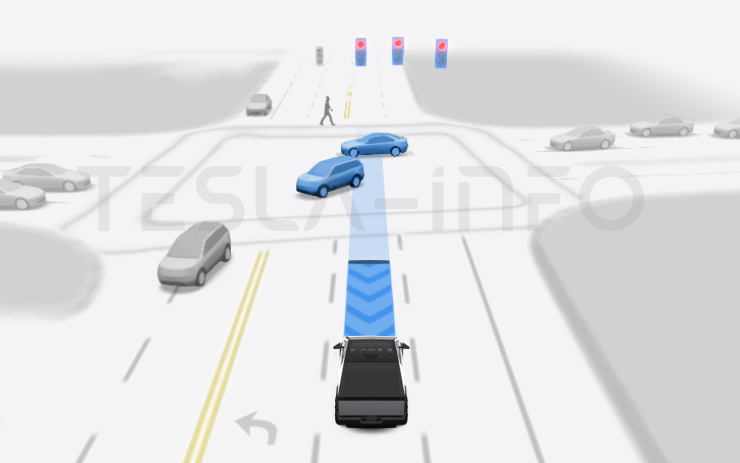
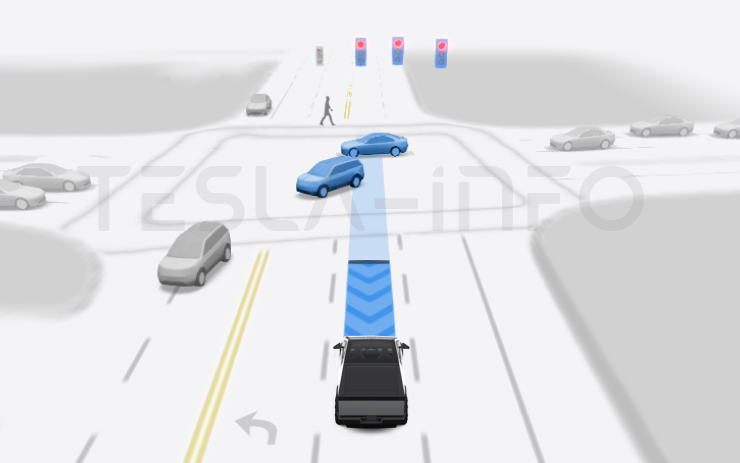
Under your supervision, Full Self-Driving (Supervised) can drive your Tesla almost anywhere. It will make lane changes, select forks to follow your navigation route, navigate around other vehicles and objects, and make left and right turns. You and anyone you authorize must use additional caution and remain attentive. It does not make your vehicle autonomous. Do not become complacent.
Full Self-Driving (Supervised) is enabled on your vehicle. To use the feature, pull the drive stalk down once. You can disable Full Self-Driving (Supervised) in Autopilot Settings.

Improve your vehicle's safety and convenience features such as siren recognition, by choosing to opt-in and share sound detection data with Tesla. A short audio recording is collected when an approaching emergency vehicle is recognized.
You can change your data sharing preferences at any time. Tesla info says even if you opt-in, sound detection data is not associated with your account or VIN.

At the end of your drive, you will receive a notification if poor camera visibility is detected. To view these images go to Service > Camera Visibility.
Images do not leave the vehicle and are not shared unless Data Sharing preferences permit. They are automatically deleted after two days. To review your Data Sharing settings, go to Software > Data Sharing.
FSD (Supervised) v13 upgrades every part of the end-to-end driving network.
Includes:
- 36 Hz, full-resolution AI4 video inputs
- Native AI4 inputs and neural network architectures
- 4.2x data scaling
- 5x training compute scaling (enabled by the Cortex cluster)
- Reduced photon-to-control latency by 2x
- Speed Profiles on both City Streets and Highways
- Integrated unpark, reverse, and park capabilities
- Improved reward predictions for collision avoidance
- Improved camera cleaning
- Redesigned controller for smoother, more accurate tracking
- Dynamic routing around road closures, which displays them along an affected route when they are detected by the fleet
Upcoming Improvements:
- 3x model size scaling
- 3x model context length scaling
- Audio inputs for better handling of emergency vehicles
- Improved reward predictions for navigation
- Improvements to false braking and slower driving in parking lots
- Support for destination options including pulling over, parking in a spot, driveway, or garage
- Efficient representation of maps and navigation inputs
- Improved handling of camera occlusions
When enabled, a button will appear on the map when driver requirements are met, and the brake pedal is pressed and released. Driver requirements include (but are not limited to):
- Driver is seated in driver's seat
- Driver is buckled
- Cabin Camera is unobstructed
When Brake Confirm is disabled, pressing the button will allow Autopilot to apply the brakes and engage FSD (Supervised).
You can enable this feature in Autopilot > Start FSD (Supervised) from Park.
This feature does not make your vehicle autonomous and you must remain attentive and be ready to take over at any time. Only a licensed driver authorized to operate the vehicle should be allowed access to the driver's seat position any time the vehicle is not in Theater or Arcade modes.

FSD (Supervised) v12.6.2 contains significant enhancements to the end-to-end architecture for HW3.
Includes:
- End to End on Highway
- Improved City Streets Behavior, which reduces false slowdowns and improves obstacle avoidance
- Customizable Speed Profiles, which apply to roads and highways with 50mph (80kph) or higher speed limit
- Earlier and more natural lane change decisions
- Redesigned controller for smoother, more accurate tracking
- Max Speed Update, where Autopilot determines the suitable speed within your allowed limit

Under your supervision, Full Self-Driving (Supervised) can drive your Tesla almost anywhere. It will make lane changes, select forks to follow your navigation route, navigate around other vehicles and objects, and make left and right turns. You and anyone you authorize must use additional caution and remain attentive. It does not make your vehicle autonomous. Do not become complacent.
Full Self-Driving (Supervised) is enabled on your vehicle. To use the feature, pull the drive stalk down once. You can disable Full Self-Driving (Supervised) in Autopilot Settings.
FSD (Supervised) v13 upgrades every part of the end-to-end driving network.
Includes:
- 36 Hz, full-resolution AI4 video inputs
- Native AI4 inputs and neural network architectures
- 4.2x data scaling
- 5x training compute scaling (enabled by the Cortex cluster)
- Reduced photon-to-control latency by 2x
- Speed Profiles on both City Streets and Highways
- Improved reward predictions for collision avoidance
- Dynamic routing around road closures, which displays them along an affected route when they are detected by the fleet
Upcoming Improvements:
- 3x model size scaling
- 3x model context length scaling
- Integrated unpark, reverse, and park capabilities
- Audio inputs for better handling of emergency vehicles
- Improved reward predictions for navigation
- Improvements to false braking and slower driving in parking lots
- Redesigned controller for smoother, more accurate tracking
- Support for destination options including pulling over, parking in a spot, driveway, or garage
- Efficient representation of maps and navigation inputs
- Improved camera cleaning and handling of camera occlusions

Improve your vehicle's safety and convenience features such as siren recognition, by choosing to opt-in and share sound detection data with Tesla. A short audio recording is collected when an approaching emergency vehicle is recognized.
You can change your data sharing preferences at any time. Even if you opt-in, sound detection data is not associated with your account or VIN.

At the end of your drive, you will receive a notification if poor camera visibility is detected. To view these images go to Service > Camera Visibility.
Images do not leave the vehicle and are not shared unless Data Sharing preferences permit. They are automatically deleted after two days. To review your Data Sharing settings, go to Software > Data Sharing.
When enabled, a button will appear on the map when driver requirements are met, and the brake pedal is pressed and released. Driver requirements include (but are not limited to):
- Driver is seated in driver's seat
- Driver is buckled
- Cabin Camera is unobstructed
When Brake Confirm is disabled, pressing the button will allow Autopilot to apply the brakes and engage FSD (Supervised).
You can enable this feature in Autopilot > Start FSD (Supervised) from Park.
This feature does not make your vehicle autonomous and you must remain attentive and be ready to take over at any time. Only a licensed driver authorized to operate the vehicle should be allowed access to the driver's seat position any time the vehicle is not in Theater or Arcade modes.

FSD (Supervised) v12.6.4 contains significant enhancements to the end-to-end architecture for HW3.
Includes:
- End to End on Highway
- Improved City Streets Behavior, which reduces false slowdowns and improves obstacle avoidance
- Customizable Speed Profiles, which apply to roads and highways with 50mph (80kph) or higher speed limit
- Earlier and more natural lane change decisions
- Redesigned controller for smoother, more accurate tracking
- Max Speed Update, where Autopilot determines the suitable speed within your allowed limit

Under your supervision, Full Self-Driving (Supervised) can drive your Tesla almost anywhere. It will make lane changes, select forks to follow your navigation route, navigate around other vehicles and objects, and make left and right turns. You and anyone you authorize must use additional caution and remain attentive. It does not make your vehicle autonomous. Do not become complacent.
Full Self-Driving (Supervised) is enabled on your vehicle. To use the feature, pull the drive stalk down once. You can disable Full Self-Driving (Supervised) in Autopilot Settings.

FSD (Supervised) v13 upgrades every part of the end-to-end driving network.
Includes:
- 36 Hz, full-resolution AI4 video inputs
- Native AI4 inputs and neural network architectures
- 4.2x data scaling
- 5x training compute scaling (enabled by the Cortex cluster)
- Reduced photon-to-control latency by 2x
- Speed Profiles on both City Streets and Highways
- Improved reward predictions for collision avoidance
- Dynamic routing around road closures, which displays them along an affected route when they are detected by the fleet
Upcoming Improvements:
- 3x model size scaling
- 3x model context length scaling
- Integrated unpark, reverse, and park capabilities
- Audio inputs for better handling of emergency vehicles
- Improved reward predictions for navigation
- Improvements to false braking and slower driving in parking lots
- Redesigned controller for smoother, more accurate tracking
- Support for destination options including pulling over, parking in a spot, driveway, or garage
- Efficient representation of maps and navigation inputs
- Improved camera cleaning and handling of camera occlusions

Improve your vehicle's safety and convenience features such as siren recognition, by choosing to opt-in and share sound detection data with Tesla. A short audio recording is collected when an approaching emergency vehicle is recognized.
You can change your data sharing preferences at any time. Even if you opt-in, sound detection data is not associated with your account or VIN.

At the end of your drive, you will receive a notification if poor camera visibility is detected. To view these images go to Service > Camera Visibility.
Images do not leave the vehicle and are not shared unless Data Sharing preferences permit. They are automatically deleted after two days. To review your Data Sharing settings, go to Software > Data Sharing.

When enabled, a button will appear on the map when driver requirements are met, and the brake pedal is pressed and released. Driver requirements include (but are not limited to):
- Driver is seated in driver's seat
- Driver is buckled
- Cabin Camera is unobstructed
When Brake Confirm is disabled, pressing the button will allow Autopilot to apply the brakes and engage FSD (Supervised).
You can enable this feature in Autopilot > Start FSD (Supervised) from Park.
This feature does not make your vehicle autonomous and you must remain attentive and be ready to take over at any time. Only a licensed driver authorized to operate the vehicle should be allowed access to the driver's seat position any time the vehicle is not in Theater or Arcade modes.
This release contains minor fixes and improvements

This release contains minor fixes and improvements

FSD (Supervised) v13 upgrades every part of the end-to-end driving network.
Includes:
- 36 Hz, full-resolution AI4 video inputs
- Native AI4 inputs and neural network architectures
- 4.2x data scaling
- 5x training compute scaling (enabled by the Cortex cluster)
- Reduced photon-to-control latency by 2x
- Speed Profiles on both City Streets and Highways
- Improved reward predictions for collision avoidance
- Dynamic routing around road closures, which displays them along an affected route when they are detected by the fleet
Upcoming Improvements:
- 3x model size scaling
- 3x model context length scaling
- Integrated unpark, reverse, and park capabilities
- Audio inputs for better handling of emergency vehicles
- Improved reward predictions for navigation
- Improvements to false braking and slower driving in parking lots
- Redesigned controller for smoother, more accurate tracking
- Support for destination options including pulling over, parking in a spot, driveway, or garage
- Efficient representation of maps and navigation inputs
- Improved camera cleaning and handling of camera occlusions

Under your supervision, Full Self-Driving (Supervised) can drive your Tesla almost anywhere. It will make lane changes, select forks to follow your navigation route, navigate around other vehicles and objects, and make left and right turns. You and anyone you authorize must use additional caution and remain attentive. It does not make your vehicle autonomous. Do not become complacent.
Full Self-Driving (Supervised) is enabled on your vehicle. To use the feature, press the right scroll wheel button once. You can disable Full Self-Driving (Supervised) in Autopilot Settings.

Improve your vehicle's safety and convenience features such as siren recognition, by choosing to opt-in and share sound detection data with Tesla. A short audio recording is collected when an approaching emergency vehicle is recognized.
You can change your data sharing preferences at any time. Even if you opt-in, sound detection data is not associated with your account or VIN.

At the end of your drive, you will receive a notification if poor camera visibility is detected. To view these images go to Service > Camera Visibility.
Images do not leave the vehicle and are not shared unless Data Sharing preferences permit. They are automatically deleted after two days. To review your Data Sharing settings, go to Software > Data Sharing.

When enabled, a button will appear on the map when driver requirements are met, and the brake pedal is pressed and released. Driver requirements include (but are not limited to):
- Driver is seated in driver's seat
- Driver is buckled
- Cabin Camera is unobstructed
When Brake Confirm is disabled, pressing the button will allow Autopilot to apply the brakes and engage FSD (Supervised).
You can enable this feature in Autopilot > Start FSD (Supervised) from Park.
This feature does not make your vehicle autonomous and you must remain attentive and be ready to take over at any time. Only a licensed driver authorized to operate the vehicle should be allowed access to the driver's seat position any time the vehicle is not in Theater or Arcade modes.

FSD (Supervised) v12.6.3 contains significant enhancements to the end-to-end architecture for HW3.
Includes:
- End to End on Highway
- Improved City Streets Behavior, which reduces false slowdowns and improves obstacle avoidance
- Customizable Speed Profiles, which apply to roads and highways with 50mph (80kph) or higher speed limit
- Earlier and more natural lane change decisions
- Redesigned controller for smoother, more accurate tracking
- Max Speed Update, where Autopilot determines the suitable speed within your allowed limit
Improve your vehicle's safety and convenience features such as siren recognition, by choosing to opt-in and share sound detection data with Tesla. A short audio recording is collected when an approaching emergency vehicle is recognized.
You can change your data sharing preferences at any time. Even if you opt-in, sound detection data is not associated with your account or VIN.
At the end of your drive, you will receive a notification if poor camera visibility is detected. To view these images go to Service > Camera Visibility.
Images do not leave the vehicle and are not shared unless Data Sharing preferences permit. They are automatically deleted after two days. To review your Data Sharing settings, go to Software > Data Sharing.
FSD (Supervised) v12.6.3 contains significant enhancements to the end-to-end architecture for HW3.
Includes:
- End to End on Highway
- Improved City Streets Behavior, which reduces false slowdowns and improves obstacle avoidance
- Customizable Speed Profiles, which apply to roads and highways with 50mph (80kph) or higher speed limit
- Earlier and more natural lane change decisions
- Redesigned controller for smoother, more accurate tracking
- Max Speed Update, where Autopilot determines the suitable speed within your allowed limit
Under your supervision, Full Self-Driving (Supervised) can drive your Tesla almost anywhere. It will make lane changes, select forks to follow your navigation route, navigate around other vehicles and objects, and make left and right turns. You and anyone you authorize must use additional caution and remain attentive. It does not make your vehicle autonomous. Do not become complacent.
Full Self-Driving (Supervised) is enabled on your vehicle. To use the feature, pull the drive stalk down once. You can disable Full Self-Driving (Supervised) in Autopilot Settings.

FSD (Supervised) v13 upgrades every part of the end-to-end driving network.
Includes:
- 36 Hz, full-resolution AI4 video inputs
- Native AI4 inputs and neural network architectures
- 4.2x data scaling
- 5x training compute scaling (enabled by the Cortex cluster)
- Reduced photon-to-control latency by 2x
- Speed Profiles on both City Streets and Highways
- Improved reward predictions for collision avoidance
- Dynamic routing around road closures, which displays them along an affected route when they are detected by the fleet
Upcoming Improvements:
- 3x model size scaling
- 3x model context length scaling
- Integrated unpark, reverse, and park capabilities
- Audio inputs for better handling of emergency vehicles
- Improved reward predictions for navigation
- Improvements to false braking and slower driving in parking lots
- Redesigned controller for smoother, more accurate tracking
- Support for destination options including pulling over, parking in a spot, driveway, or garage
- Efficient representation of maps and navigation inputs
- Improved camera cleaning and handling of camera occlusions

Under your supervision, Full Self-Driving (Supervised) can drive your Tesla almost anywhere. It will make lane changes, select forks to follow your navigation route, navigate around other vehicles and objects, and make left and right turns. You and anyone you authorize must use additional caution and remain attentive. It does not make your vehicle autonomous. Do not become complacent.
Full Self-Driving (Supervised) is enabled on your vehicle. To use the feature, press the right scroll wheel button once. You can disable Full Self-Driving (Supervised) in Autopilot Settings.

Improve your vehicle's safety and convenience features such as siren recognition, by choosing to opt-in and share sound detection data with Tesla. A short audio recording is collected when an approaching emergency vehicle is recognized.
You can change your data sharing preferences at any time. Even if you opt-in, sound detection data is not associated with your account or VIN.

At the end of your drive, you will receive a notification if poor camera visibility is detected. To view these images go to Service > Camera Visibility.
Images do not leave the vehicle and are not shared unless Data Sharing preferences permit. They are automatically deleted after two days. To review your Data Sharing settings, go to Software > Data Sharing.
When enabled, a button will appear on the map when driver requirements are met, and the brake pedal is pressed and released. Driver requirements include (but are not limited to):
- Driver is seated in driver's seat
- Driver is buckled
- Cabin Camera is unobstructed
When Brake Confirm is disabled, pressing the button will allow Autopilot to apply the brakes and engage FSD (Supervised).
You can enable this feature in Autopilot > Start FSD (Supervised) from Park.
This feature does not make your vehicle autonomous and you must remain attentive and be ready to take over at any time. Only a licensed driver authorized to operate the vehicle should be allowed access to the driver's seat position any time the vehicle is not in Theater or Arcade modes.

FSD (Supervised) v12.6.3 contains significant enhancements to the end-to-end architecture for HW3.
Includes:
- End to End on Highway
- Improved City Streets Behavior, which reduces false slowdowns and improves obstacle avoidance
- Customizable Speed Profiles, which apply to roads and highways with 50mph (80kph) or higher speed limit
- Earlier and more natural lane change decisions
- Redesigned controller for smoother, more accurate tracking
- Max Speed Update, where Autopilot determines the suitable speed within your allowed limit
This release contains minor fixes and improvements

This release contains minor fixes and improvements

This release contains minor fixes and improvements
Trailer Profiles allows you to save data and preferences associated with your trailer. By accurately entering your trailer's mass, dimensions, auxiliary settings, etc., your vehicle is better able to estimate energy consumption while driving to your destination.
To create a profile, navigate to Controls > Towing > Trailer Profiles.
Buckle up for the ride of your life, except, surprise! You're not in the car. ASS (Actually Smart Summon) allows your vehicle to come to you, or head to a spot that you choose, all on its own. It’s like magic, but with more tech and less wand-waving.
Additionally, Dumb Summon allows you to move your Tesla forward or back with simple controls directly in your mobile app.
To use, open your Tesla app, hit the Summon tab, and get a live feed from your car’s cameras to guide your supervision.
- COME TO ME: Press and hold to have your Tesla come to you.
- GO TO TARGET: Set where you want your Tesla to go, then press and hold to send it on its merry way.
You can halt your journey anytime by just letting go of the button. See your Owner's Manual for additional details.
ASS and Dumb Summon should only be used in parking lots or driveways. Keep an eye on your car and its surroundings at all times. Stay vigilant, especially around the fast and the furious (people, bikes, and other cars). You are still responsible for your vehicle, so watch as it drives and stop it if necessary.
Note: ASS requires the Tesla mobile app version 4.38.0 or later.
Now Includes:
- Public/High-Speed Roads pause your ASS maneuver
- Improved Blocked Camera Aborts
- Reduced False Positive Collision Mitigation Aborts
- Refined Dumb Summon behavior at curbs
- Added Custom/Fart Completion Sounds
Coming Soon:
- HomeLink & myQ garage integration
As is common with many releases, Tesla have made some changes to the hidden service menus. This time the changes are mainly to align the Intel MCU cars with the AMD Ryzen MCU's, with an additional feature for Cybertruk owners. Only use the hidden service menu with care!
The energy screen has been changed, the previous choice of options over how far the average efficiency is calculated has been changed for a fixed 200 mile one. As the data from this screen can be used to calculate the usable battery capacity, we have updated our Guyide to calculating the battery capacity.
Tesla often make changes to the visuals and alerts as part of a release. In this release they have:
FSD (Supervised) v13 upgrades every part of the end-to-end driving network.
Includes:
- 36 Hz, full-resolution AI4 video inputs
- Native AI4 inputs and neural network architectures
- 4.2x data scaling
- 5x training compute scaling (enabled by the Cortex cluster)
- Reduced photon-to-control latency by 2x
- Speed Profiles on both City Streets and Highways
- Integrated unpark, reverse, and park capabilities
- Improved reward predictions for collision avoidance
- Improved camera cleaning
- Redesigned controller for smoother, more accurate tracking
- Dynamic routing around road closures, which displays them along an affected route when they are detected by the fleet
Upcoming Improvements:
- 3x model size scaling
- 3x model context length scaling
- Audio inputs for better handling of emergency vehicles
- Improved reward predictions for navigation
- Improvements to false braking and slower driving in parking lots
- Support for destination options including pulling over, parking in a spot, driveway, or garage
- Efficient representation of maps and navigation inputs
- Improved handling of camera occlusions
Under your supervision, Full Self-Driving (Supervised) can drive your Tesla almost anywhere. It will make lane changes, select forks to follow your navigation route, navigate around other vehicles and objects, and make left and right turns. You and anyone you authorize must use additional caution and remain attentive. It does not make your vehicle autonomous. Do not become complacent.
Full Self-Driving (Supervised) is enabled on your vehicle. To use the feature, press the right scroll wheel button once. You can disable Full Self-Driving (Supervised) in Autopilot Settings.
When enabled, a button will appear on the map when driver requirements are met, and the brake pedal is pressed and released. Driver requirements include (but are not limited to):
- Driver is seated in driver's seat
- Driver is buckled
- Cabin Camera is unobstructed
When Brake Confirm is disabled, pressing the button will allow Autopilot to apply the brakes and engage FSD (Supervised).
You can enable this feature in Autopilot > Start FSD (Supervised) from Park.
This feature does not make your vehicle autonomous and you must remain attentive and be ready to take over at any time. Only a licensed driver authorized to operate the vehicle should be allowed access to the driver's seat position any time the vehicle is not in Theater or Arcade modes.
Improve your vehicle's safety and convenience features such as siren recognition, by choosing to opt-in and share sound detection data with Tesla. A short audio recording is collected when an approaching emergency vehicle is recognized.
You can change your data sharing preferences at any time. Even if you opt-in, sound detection data is not associated with your account or VIN.
At the end of your drive, you will receive a notification if poor camera visibility is detected. To view these images go to Service > Camera Visibility.
Images do not leave the vehicle and are not shared unless Data Sharing preferences permit. They are automatically deleted after two days. To review your Data Sharing settings, go to Software > Data Sharing.
FSD (Supervised) v13 upgrades every part of the end-to-end driving network.
Includes:
- 36 Hz, full-resolution AI4 video inputs
- Native AI4 inputs and neural network architectures
- 4.2x data scaling
- 5x training compute scaling (enabled by the Cortex cluster)
- Reduced photon-to-control latency by 2x
- Speed Profiles on both City Streets and Highways
- Improved reward predictions for collision avoidance
- Dynamic routing around road closures, which displays them along an affected route when they are detected by the fleet
Upcoming Improvements:
- 3x model size scaling
- 3x model context length scaling
- Integrated unpark, reverse, and park capabilities
- Audio inputs for better handling of emergency vehicles
- Improved reward predictions for navigation
- Improvements to false braking and slower driving in parking lots
- Redesigned controller for smoother, more accurate tracking
- Support for destination options including pulling over, parking in a spot, driveway, or garage
- Efficient representation of maps and navigation inputs
- Improved camera cleaning and handling of camera occlusions

Under your supervision, Full Self-Driving (Supervised) can drive your Tesla almost anywhere. It will make lane changes, select forks to follow your navigation route, navigate around other vehicles and objects, and make left and right turns. You and anyone you authorize must use additional caution and remain attentive. It does not make your vehicle autonomous. Do not become complacent.
Full Self-Driving (Supervised) is enabled on your vehicle. To use the feature, press the right scroll wheel button once. You can disable Full Self-Driving (Supervised) in Autopilot Settings.

Improve your vehicle's safety and convenience features such as siren recognition, by choosing to opt-in and share sound detection data with Tesla. A short audio recording is collected when an approaching emergency vehicle is recognized.
You can change your data sharing preferences at any time. Even if you opt-in, sound detection data is not associated with your account or VIN.

At the end of your drive, you will receive a notification if poor camera visibility is detected. To view these images go to Service > Camera Visibility.
Images do not leave the vehicle and are not shared unless Data Sharing preferences permit. They are automatically deleted after two days. To review your Data Sharing settings, go to Software > Data Sharing.
Experience Rainbow Road inside the cabin with accent lighting. Go to App Launcher > Toybox > Rainbow Road.
When enabled, a button will appear on the map when driver requirements are met, and the brake pedal is pressed and released. Driver requirements include (but are not limited to):
- Driver is seated in driver's seat
- Driver is buckled
- Cabin Camera is unobstructed
When Brake Confirm is disabled, pressing the button will allow Autopilot to apply the brakes and engage FSD (Supervised).
You can enable this feature in Autopilot > Start FSD (Supervised) from Park.
This feature does not make your vehicle autonomous and you must remain attentive and be ready to take over at any time. Only a licensed driver authorized to operate the vehicle should be allowed access to the driver's seat position any time the vehicle is not in Theater or Arcade modes.

FSD (Supervised) v12.6.1 contains significant enhancements to the end-to-end architecture for HW3.
Includes:
- End to End on Highway
- Improved City Streets Behavior, which reduces false slowdowns and improves obstacle avoidance
- Customizable Speed Profiles, which apply to roads and highways with 50mph (80kph) or higher speed limit
- Earlier and more natural lane change decisions
- Redesigned controller for smoother, more accurate tracking
- Max Speed Update, where Autopilot determines the suitable speed within your allowed limit

Under your supervision, Full Self-Driving (Supervised) can drive your Tesla almost anywhere. It will make lane changes, select forks to follow your navigation route, navigate around other vehicles and objects, and make left and right turns. You and anyone you authorize must use additional caution and remain attentive. It does not make your vehicle autonomous. Do not become complacent.
Full Self-Driving (Supervised) is enabled on your vehicle. To use the feature, press the right scroll wheel button once. You can disable Full Self-Driving (Supervised) in Autopilot Settings.

Improve your vehicle's safety and convenience features such as siren recognition, by choosing to opt-in and share sound detection data with Tesla. A short audio recording is collected when an approaching emergency vehicle is recognized.
You can change your data sharing preferences at any time. Even if you opt-in, sound detection data is not associated with your account or VIN.

At the end of your drive, you will receive a notification if poor camera visibility is detected. To view these images go to Service > Camera Visibility.
Images do not leave the vehicle and are not shared unless Data Sharing preferences permit. They are automatically deleted after two days. To review your Data Sharing settings, go to Software > Data Sharing.
FSD (Supervised) v13 upgrades every part of the end-to-end driving network.
Includes:
- 36 Hz, full-resolution AI4 video inputs
- Native AI4 inputs and neural network architectures
- 4.2x data scaling
- 5x training compute scaling (enabled by the Cortex cluster)
- Reduced photon-to-control latency by 2x
- Speed Profiles on both City Streets and Highways
- Improved reward predictions for collision avoidance
- Dynamic routing around road closures, which displays them along an affected route when they are detected by the fleet
Upcoming Improvements:
- 3x model size scaling
- 3x model context length scaling
- Integrated unpark, reverse, and park capabilities
- Audio inputs for better handling of emergency vehicles
- Improved reward predictions for navigation
- Improvements to false braking and slower driving in parking lots
- Redesigned controller for smoother, more accurate tracking
- Support for destination options including pulling over, parking in a spot, driveway, or garage
- Efficient representation of maps and navigation inputs
- Improved camera cleaning and handling of camera occlusions
FSD (Supervised) v12.6 contains significant enhancements to the end-to-end architecture for HW3.
Includes:
- End to End on Highway
- Improved City Streets Behavior, which reduces false slowdowns and improves obstacle avoidance
- Customizable Speed Profiles, which apply to roads and highways with 50mph (80kph) or higher speed limit
- Earlier and more natural lane change decisions
- Redesigned controller for smoother, more accurate tracking
- Max Speed Update, where Autopilot determines the suitable speed within your allowed limit
Under your supervision, Full Self-Driving (Supervised) can drive your Tesla almost anywhere. It will make lane changes, select forks to follow your navigation route, navigate around other vehicles and objects, and make left and right turns. You and anyone you authorize must use additional caution and remain attentive. It does not make your vehicle autonomous. Do not become complacent.
Full Self-Driving (Supervised) is enabled on your vehicle. To use the feature, press the right scroll wheel button once. You can disable Full Self-Driving (Supervised) in Autopilot Settings.
Improve your vehicle's safety and convenience features such as siren recognition, by choosing to opt-in and share sound detection data with Tesla. A short audio recording is collected when an approaching emergency vehicle is recognized.
You can change your data sharing preferences at any time. Even if you opt-in, sound detection data is not associated with your account or VIN.
At the end of your drive, you will receive a notification if poor camera visibility is detected. To view these images go to Service > Camera Visibility.
Images do not leave the vehicle and are not shared unless Data Sharing preferences permit. They are automatically deleted after two days. To review your Data Sharing settings, go to Software > Data Sharing.
There is o reliable way to get the a software update from Tesla unless it is linked to a service request.
Some features are only available on some models, versions of hardware, software options purchased and even countries. We list as much information as we can as to which of those are required for each feature based on the information taken from real cars.
Tesla info is not affilated or linked to Tesla Inc. and their rights are reserved. We provide this information and other services to assist in the buying of a Tesla and therefore in support of the growth of Tesla. By using our site, you acknowledge that you have read and understand our Privacy and Cookie Policy. Your use of the tesla-info website is subject to these policies and terms. All data is provided on a reasonable endeavours basis but errors and omissions may exist. No data should be relied upon as being accurate and additional checks should be made if the information is material to any purchase or use of the car.