Tesla Software Release 2022.12.3.20
Last updated 13-Mar-2026
Tesla Software release 2022.12.3.20 including Visualizations, Full Self-Driving (Beta) Suspension, FSD Beta v10.12.2, Full Self-Driving (Beta), Driving Visualization, Cabin Camera, Autopilot Maximum Speed, Language Support, Rear Display, Superchargings List, Service Mode, Vehicle Preconditioning, Active Phone Calls, Autopilot Speed Indicator, Cloud Profiles.
Included releases
2022.12.3.20, (no cars)
Regional coverage by model
North America-----Europe-----RoW-----
Visualizations (part of 2022.12.3.20)
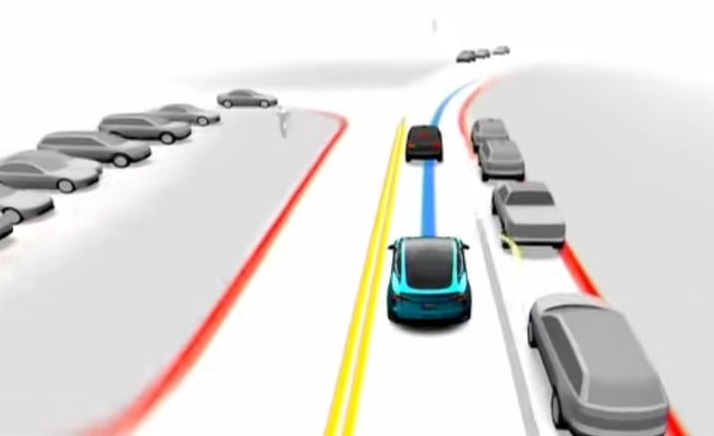
This beta includes more detailed vehicle models that have doors, windows and wheels. In addition to the improved models, this update will also display if a surrounding vehicle has an open door or an active turn signal.
Full Self-Driving (Beta) Suspension (part of 2022.12.3.20)
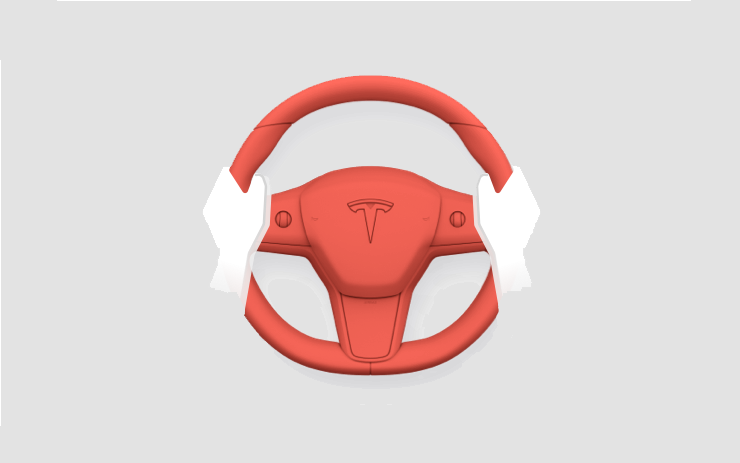
For maximum safety and accountability, use of Full Self-Driving (Beta) will be suspended if improper usage is detected. Improper usage is when you, or another driver of your vehicle, receive five 'Forced Autopilot Disengagements'. A disengagement is when the Autopilot system disengages for the remainder of a trip after the driver receives several audio and visual warnings for inattentiveness. Driver-initiated disengagements do not count as improper usage and are expected from the driver. Keep your hands on the wheel and remain attentive at all times. Use of any hand-held devices while using Autopilot is not allowed.
FSD Beta v10.12.2 (part of 2022.12.3.20)
- Upgraded decision making framework for unprotected left turns with better modeling of objects' response to ego's actions by adding more features that shape the go/no-go decision. This increases robustness to noisy measurements while being more sticky to decisions within a safety margin. The framework also leverages median safe regions when necessary to maneuver across large turns and accelerating harder through maneuvers when required to safely exit the intersection. - Improved creeping for visibility using more accurate lane geometry and higher resolution occlusion detection. - Reduced instances of attempting uncomfortable turns through better integration with object future predictions during lane selection. - Upgraded planner to rely less on lanes to enable maneuvering smoothly out of restricted space. - Increased safety of turns with crossing traffic by improving the architecture of the lanes neural network which greatly boosted recall and geometric accuracy of crossing lanes. - Improved the recall and geometric accuracy of all lane predictions by adding 180k video clips to the training set. - Reduced traffic control related false slowdowns through better integration with lane structure and improved behavior with respect to yellow lights. - Improved the geometric accuracy of road edge and line predictions by adding a mixing/coupling layer with the generalized static obstacle network. - Improved geometric accuracy and understanding of visibility by retraining the generalized static obstacle network with improved data from the autolabeler and by adding 30k more videos clips. - Improved recall of motorcycles, reduced velocity error of close-by pedestrians and bicyclists, and reduced heading error of pedestrians by adding new sim and autolabeled data to the training set. - Improved precision of the "is parked" attribute on vehicles by adding 41k clips to the training set. Solved 48% of failure cases captured by our telemetry of 10.11. - Improved detection recall of far-away crossing objects by regenerating the dataset with improved versions of the neural networks used in the autolabeler which increased data quality. - Improved offsetting behavior when maneuvering around cars with open doors. - Improved angular velocity and lane-centric velocity for non-VRU objects by upgrading it into network predicted tasks. - Improved comfort when lane changing behind vehicles with harsh deceleration by tighter integration between lead vehicles future motion estimate and planned lane change profile. - Increased reliance on network-predicted acceleration for all moving objects, previously only longitudinally relevant objects. - Updated nearby vehicle assets with visualization indicating when a vehicle has a door open. - Improved system frame rate +1.8 frames per second by removing three legacy neural networks. Press the "Video Record" button on the top bar UI to share your feedback. When pressed, your vehicle's external cameras will share a short VIN-associated Autopilot Snapshot with the Tesla engineering team to help make improvements to FSD. You will not be able to view the clip.
Full Self-Driving (Beta) (part of 2022.12.3.20)
Full Self-Driving is in early limited access Beta and must be used with additional caution. It may do the wrong thing at the worst time, so you must always keep your hands on the wheel and pay extra attention to the road. Do not become complacent. When Full Self-Driving is enabled, your vehicle will make lane changes off highway, select forks to follow your navigation route, navigate around other vehicles and objects, and make left and right turns. Use Full Self-Driving in limited Beta only if you pay constant attention to the road, and be prepared to act immediately, especially around blind corners, crossing intersections, and in narrow driving situations. Your vehicle is running on Tesla Vision! Note that Tesla Vision also includes some temporary limitations, follow distance is limited to 2-7 and Autopilot top speed is 80mph.
Driving Visualization (part of 2022.12.3.20)
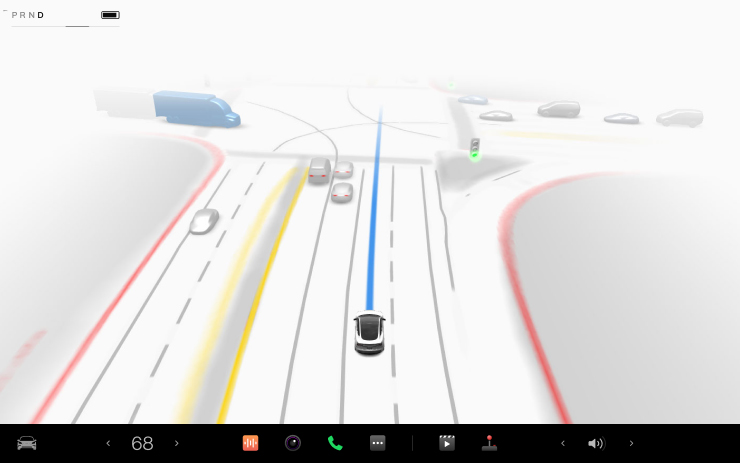
To view an expanded driving visualization when in drive with Full Self-Driving enabled, drag the light gray visualization bar to the right.
Cabin Camera (part of 2022.12.3.20)
The cabin camera above your rearview mirror can now determine driver inattentiveness and provide you with audible alerts, to remind you to keep your eyes on the road when Autopilot is engaged. Camera images do not leave the vehicle itself, which means the system cannot save or transmit information unless you enable data sharing. To change your data settings, tap Controls > Safety & Security > Data Sharing on your car's touchscreen.
Autopilot Maximum Speed (part of 2022.12.3.20)
Autopilot's maximum speed has been increased from 80 mph to 85 mph. Please continue to remain attentive and be ready to take over while using Autopilot features.
Language Support (part of 2022.12.3.20)
Your touchscreen is now available in Czech. To switch your language setting, tap Controls > Display > Touchscreen Language.
Rear Display (part of 2022.12.3.20)
The seat heater visualization for the rear display has been updated. The vehicle seats are now displayed in a horizontal orientation, similar to the main display. If your vehicle is equipped with a third row, you can now adjust the heated seats for the third row from the rear display as well.

Superchargings List (part of 2022.12.3.20)
When viewing details about a Supercharger, the diaglog box will no longer be obscured by the list of nearby chargers.
Service Mode (part of 2022.12.3.20)
Service Mode has been completely revamped with a new, more intuitive user interface. Information has been reorganized to make it easier to access and more detail is now displayed for any vehicle alerts. Service Mode is a mode that's typically reserved for service technicians to view specific information about a vehicle such as battery voltage, battery temperature and vehicle fault codes. It also allows technicians to access certain options for testing that are not normally available for owners.

Vehicle Preconditioning (part of 2022.12.3.20)
Vehicle preconditioning accessed via the Tesla app will now remain active up to 30 minutes after a door is opened, making it easier load your vehicle without affecting climate control.
Active Phone Calls (part of 2022.12.3.20)
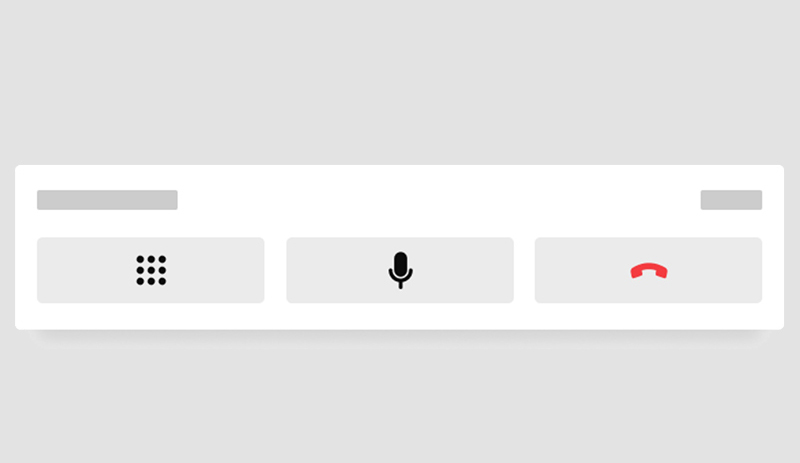
You can now hide your phone call card, allowing you to see the next turn when the navigation turn list is covered. Tap the phone icon on the status bar to show the card again.
Autopilot Speed Indicator (part of 2022.12.3.20)
When adjusting the vehicle's maximum speed with Traffic-Aware Cruise Control or Autopilot, a downward or upward arrow will now be shown to indicate that the maximum speed has been adjusted with the scroll wheel.

Cloud Profiles (part of 2022.12.3.20)
Tesla continues the development of 'Cloud Profiles'. Cloud Profiles will let you sync select vehicle profiles across various vehicles. New code related to Cloud Profiles has been found in 2022.8.2 that reveals details on how the feature will work.
Other release notes for the family: 2022.12
Bugfix (part of 2022.12.3.9)
Bugfix.
See Release Notes 2022.12 for the release notes family
Bugfix (part of 2022.12.3.8)
Bugfix.
See Release Notes 2022.12 for the release notes family
Bugfix (part of 2022.12.3.7)
Bugfix.
See Release Notes 2022.12 for the release notes family
Over-the-Air (OTA) recall (part of 2022.12.3.6)
We performed an Over-the-Air (OTA) recall remedy of the drive inverter software on your vehicle. The remedy will gradually activate the drive inverter components while your vehicle is charging to further reduce the very low risk of power interruption during a drive cycle. There is no action you need to take, and Tesla will continuously monitor your vehicle's drive inverter following this update.
Range Display (part of 2022.12.3.5)
Your vehicle's range estimation has been modified to better represent real-world conditions.
Autopilot Maximum Speed (part of 2022.12.3.4)
Autopilot's maximum speed has been increased from 80 mph to 85 mph. Please continue to remain attentive and be ready to take over while using Autopilot features.
Rear Display (part of 2022.12.3.4)
The seat heater visualization for the rear display has been updated. The vehicle seats are now displayed in a horizontal orientation, similar to the main display. If your vehicle is equipped with a third row, you can now adjust the heated seats for the third row from the rear display as well.
Superchargings List (part of 2022.12.3.4)
When viewing details about a Supercharger, the diaglog box will no longer be obscured by the list of nearby chargers.
Service Mode (part of 2022.12.3.4)
Service Mode has been completely revamped with a new, more intuitive user interface. Information has been reorganized to make it easier to access and more detail is now displayed for any vehicle alerts. Service Mode is a mode that's typically reserved for service technicians to view specific information about a vehicle such as battery voltage, battery temperature and vehicle fault codes. It also allows technicians to access certain options for testing that are not normally available for owners.
Rear Display (part of 2022.12.3.3)
The seat heater visualization for the rear display has been updated. The vehicle seats are now displayed in a horizontal orientation, similar to the main display. If your vehicle is equipped with a third row, you can now adjust the heated seats for the third row from the rear display as well.
Language Support (part of 2022.12.3.3)
Your touchscreen is now available in Turkish. To switch your language setting, tap Controls > Display > Touchscreen Language.
Superchargings List (part of 2022.12.3.3)
When viewing details about a Supercharger, the diaglog box will no longer be obscured by the list of nearby chargers.
Service Mode (part of 2022.12.3.3)
Service Mode has been completely revamped with a new, more intuitive user interface. Information has been reorganized to make it easier to access and more detail is now displayed for any vehicle alerts. Service Mode is a mode that's typically reserved for service technicians to view specific information about a vehicle such as battery voltage, battery temperature and vehicle fault codes. It also allows technicians to access certain options for testing that are not normally available for owners.
Visualizations (part of 2022.12.3.20)
This beta includes more detailed vehicle models that have doors, windows and wheels. In addition to the improved models, this update will also display if a surrounding vehicle has an open door or an active turn signal.
Full Self-Driving (Beta) Suspension (part of 2022.12.3.20)
For maximum safety and accountability, use of Full Self-Driving (Beta) will be suspended if improper usage is detected. Improper usage is when you, or another driver of your vehicle, receive five 'Forced Autopilot Disengagements'. A disengagement is when the Autopilot system disengages for the remainder of a trip after the driver receives several audio and visual warnings for inattentiveness. Driver-initiated disengagements do not count as improper usage and are expected from the driver. Keep your hands on the wheel and remain attentive at all times. Use of any hand-held devices while using Autopilot is not allowed.
FSD Beta v10.12.2 (part of 2022.12.3.20)
- Upgraded decision making framework for unprotected left turns with better modeling of objects' response to ego's actions by adding more features that shape the go/no-go decision. This increases robustness to noisy measurements while being more sticky to decisions within a safety margin. The framework also leverages median safe regions when necessary to maneuver across large turns and accelerating harder through maneuvers when required to safely exit the intersection. - Improved creeping for visibility using more accurate lane geometry and higher resolution occlusion detection. - Reduced instances of attempting uncomfortable turns through better integration with object future predictions during lane selection. - Upgraded planner to rely less on lanes to enable maneuvering smoothly out of restricted space. - Increased safety of turns with crossing traffic by improving the architecture of the lanes neural network which greatly boosted recall and geometric accuracy of crossing lanes. - Improved the recall and geometric accuracy of all lane predictions by adding 180k video clips to the training set. - Reduced traffic control related false slowdowns through better integration with lane structure and improved behavior with respect to yellow lights. - Improved the geometric accuracy of road edge and line predictions by adding a mixing/coupling layer with the generalized static obstacle network. - Improved geometric accuracy and understanding of visibility by retraining the generalized static obstacle network with improved data from the autolabeler and by adding 30k more videos clips. - Improved recall of motorcycles, reduced velocity error of close-by pedestrians and bicyclists, and reduced heading error of pedestrians by adding new sim and autolabeled data to the training set. - Improved precision of the "is parked" attribute on vehicles by adding 41k clips to the training set. Solved 48% of failure cases captured by our telemetry of 10.11. - Improved detection recall of far-away crossing objects by regenerating the dataset with improved versions of the neural networks used in the autolabeler which increased data quality. - Improved offsetting behavior when maneuvering around cars with open doors. - Improved angular velocity and lane-centric velocity for non-VRU objects by upgrading it into network predicted tasks. - Improved comfort when lane changing behind vehicles with harsh deceleration by tighter integration between lead vehicles future motion estimate and planned lane change profile. - Increased reliance on network-predicted acceleration for all moving objects, previously only longitudinally relevant objects. - Updated nearby vehicle assets with visualization indicating when a vehicle has a door open. - Improved system frame rate +1.8 frames per second by removing three legacy neural networks. Press the "Video Record" button on the top bar UI to share your feedback. When pressed, your vehicle's external cameras will share a short VIN-associated Autopilot Snapshot with the Tesla engineering team to help make improvements to FSD. You will not be able to view the clip.
Full Self-Driving (Beta) (part of 2022.12.3.20)
Full Self-Driving is in early limited access Beta and must be used with additional caution. It may do the wrong thing at the worst time, so you must always keep your hands on the wheel and pay extra attention to the road. Do not become complacent. When Full Self-Driving is enabled, your vehicle will make lane changes off highway, select forks to follow your navigation route, navigate around other vehicles and objects, and make left and right turns. Use Full Self-Driving in limited Beta only if you pay constant attention to the road, and be prepared to act immediately, especially around blind corners, crossing intersections, and in narrow driving situations. Your vehicle is running on Tesla Vision! Note that Tesla Vision also includes some temporary limitations, follow distance is limited to 2-7 and Autopilot top speed is 80mph.
Driving Visualization (part of 2022.12.3.20)
To view an expanded driving visualization when in drive with Full Self-Driving enabled, drag the light gray visualization bar to the right.
Cabin Camera (part of 2022.12.3.20)
The cabin camera above your rearview mirror can now determine driver inattentiveness and provide you with audible alerts, to remind you to keep your eyes on the road when Autopilot is engaged. Camera images do not leave the vehicle itself, which means the system cannot save or transmit information unless you enable data sharing. To change your data settings, tap Controls > Safety & Security > Data Sharing on your car's touchscreen.
Autopilot Maximum Speed (part of 2022.12.3.20)
Autopilot's maximum speed has been increased from 80 mph to 85 mph. Please continue to remain attentive and be ready to take over while using Autopilot features.
Language Support (part of 2022.12.3.20)
Your touchscreen is now available in Czech. To switch your language setting, tap Controls > Display > Touchscreen Language.
Rear Display (part of 2022.12.3.20)
The seat heater visualization for the rear display has been updated. The vehicle seats are now displayed in a horizontal orientation, similar to the main display. If your vehicle is equipped with a third row, you can now adjust the heated seats for the third row from the rear display as well.
Superchargings List (part of 2022.12.3.20)
When viewing details about a Supercharger, the diaglog box will no longer be obscured by the list of nearby chargers.
Service Mode (part of 2022.12.3.20)
Service Mode has been completely revamped with a new, more intuitive user interface. Information has been reorganized to make it easier to access and more detail is now displayed for any vehicle alerts. Service Mode is a mode that's typically reserved for service technicians to view specific information about a vehicle such as battery voltage, battery temperature and vehicle fault codes. It also allows technicians to access certain options for testing that are not normally available for owners.
Vehicle Preconditioning (part of 2022.12.3.20)
Vehicle preconditioning accessed via the Tesla app will now remain active up to 30 minutes after a door is opened, making it easier load your vehicle without affecting climate control.
Active Phone Calls (part of 2022.12.3.20)
You can now hide your phone call card, allowing you to see the next turn when the navigation turn list is covered. Tap the phone icon on the status bar to show the card again.
Autopilot Speed Indicator (part of 2022.12.3.20)
When adjusting the vehicle's maximum speed with Traffic-Aware Cruise Control or Autopilot, a downward or upward arrow will now be shown to indicate that the maximum speed has been adjusted with the scroll wheel.
Cloud Profiles (part of 2022.12.3.20)
Tesla continues the development of 'Cloud Profiles'. Cloud Profiles will let you sync select vehicle profiles across various vehicles. New code related to Cloud Profiles has been found in 2022.8.2 that reveals details on how the feature will work.
Rear Display (part of 2022.12.3.2)
The seat heater visualization for the rear display has been updated. The vehicle seats are now displayed in a horizontal orientation, similar to the main display. If your vehicle is equipped with a third row, you can now adjust the heated seats for the third row from the rear display as well.
Language Support (part of 2022.12.3.2)
Your touchscreen is now available in Turkish. To switch your language setting, tap Controls > Display > Touchscreen Language.
Service Mode (part of 2022.12.3.2)
Service Mode has been completely revamped with a new, more intuitive user interface. Information has been reorganized to make it easier to access and more detail is now displayed for any vehicle alerts. Service Mode is a mode that's typically reserved for service technicians to view specific information about a vehicle such as battery voltage, battery temperature and vehicle fault codes. It also allows technicians to access certain options for testing that are not normally available for owners.
Bugfix (part of 2022.12.3.17)
Bugfix.
See Release Notes 2022.12 for the release notes family
Autopilot Maximum Speed (part of 2022.12.3.16)
Autopilot's maximum speed has been increased from 80 mph to 85 mph. Please continue to remain attentive and be ready to take over while using Autopilot features.
Rear Display (part of 2022.12.3.16)
The seat heater visualization for the rear display has been updated. The vehicle seats are now displayed in a horizontal orientation, similar to the main display. If your vehicle is equipped with a third row, you can now adjust the heated seats for the third row from the rear display as well.
Language Support (part of 2022.12.3.16)
Your touchscreen is now available in Turkish. To switch your language setting, tap Controls > Display > Touchscreen Language.
Superchargings List (part of 2022.12.3.16)
When viewing details about a Supercharger, the diaglog box will no longer be obscured by the list of nearby chargers.
Service Mode (part of 2022.12.3.16)
Service Mode has been completely revamped with a new, more intuitive user interface. Information has been reorganized to make it easier to access and more detail is now displayed for any vehicle alerts. Service Mode is a mode that's typically reserved for service technicians to view specific information about a vehicle such as battery voltage, battery temperature and vehicle fault codes. It also allows technicians to access certain options for testing that are not normally available for owners.
Bugfix (part of 2022.12.3.15)
Bugfix.
See Release Notes 2022.12 for the release notes family
Bugfix (part of 2022.12.3.14)
Bugfix.
See Release Notes 2022.12 for the release notes family
Bugfix (part of 2022.12.3.13)
Bugfix.
See Release Notes 2022.12 for the release notes family
Autopilot Maximum Speed (part of 2022.12.3.12)
Autopilot's maximum speed has been increased from 80 mph to 85 mph. Please continue to remain attentive and be ready to take over while using Autopilot features.
Rear Display (part of 2022.12.3.12)
The seat heater visualization for the rear display has been updated. The vehicle seats are now displayed in a horizontal orientation, similar to the main display. If your vehicle is equipped with a third row, you can now adjust the heated seats for the third row from the rear display as well.
Superchargings List (part of 2022.12.3.12)
When viewing details about a Supercharger, the diaglog box will no longer be obscured by the list of nearby chargers.
Service Mode (part of 2022.12.3.12)
Service Mode has been completely revamped with a new, more intuitive user interface. Information has been reorganized to make it easier to access and more detail is now displayed for any vehicle alerts. Service Mode is a mode that's typically reserved for service technicians to view specific information about a vehicle such as battery voltage, battery temperature and vehicle fault codes. It also allows technicians to access certain options for testing that are not normally available for owners.
Bugfix (part of 2022.12.3.11)
Bugfix.
See Release Notes 2022.12 for the release notes family
Bugfix (part of 2022.12.3.10)
Bugfix.
See Release Notes 2022.12 for the release notes family
Rear Display (part of 2022.12.3.1)
The seat heater visualization for the rear display has been updated. The vehicle seats are now displayed in a horizontal orientation, similar to the main display. If your vehicle is equipped with a third row, you can now adjust the heated seats for the third row from the rear display as well.
Display (part of 2022.12.3.1)
Update to Model 3 Performance vehicles to correct a vehicle software issue where the unit of speed is not displayed on the UI while using Track Mode. The UI will continue to display the vehicle speed, but not the unit of speed and regulatory standards require this unit to be displayed as Track Mode may be used outside of closed-circuit courses.
Over-the-Air (OTA) recall (part of 2022.12.3)
We performed an Over-the-Air (OTA) recall remedy of the drive inverter software on your vehicle. The remedy will gradually activate the drive inverter components while your vehicle is charging to further reduce the very low risk of power interruption during a drive cycle. There is no action you need to take, and Tesla will continuously monitor your vehicle's drive inverter following this update.
Range Display (part of 2022.12.3)
Your vehicle's range estimation has been modified to better represent real-world conditions.
Additional Bottom Bar Customization (part of 2022.12.3)
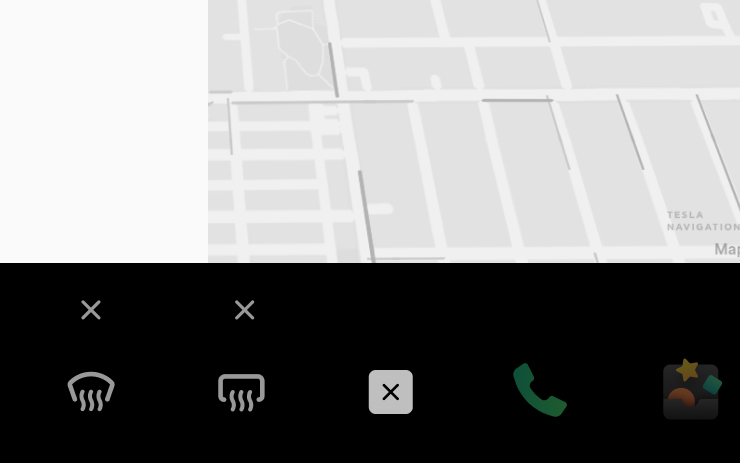
You can now add vehicle controls such as defrost, windshield wipers and seat heaters to the bottom bar. Long press any app icon to enter edit mode, then drag the desired control to the bottom bar.

Disney+ (part of 2022.12.3)
Tesla Theater now supports Disney+. To launch Tesla Theater, tap the Theater icon in the Application Launcher while your car is in PARK.

Child Lock (part of 2022.12.3)
Child Lock can now be enabled for a single rear door. Tap Controls > Child Lock, and select Right, Left, or Both.

Charging Time Estimation (part of 2022.12.3)
Estimated charging times are now more accurate by taking the current battery pack temperature into account when a vehicle is connected to a Supercharger, or a third-party fast charger.
Additional Mobile App Controls (part of 2022.12.3)
Dog Mode and Camp Mode can now be enabled from the Tesla app. Note: This functionality requires mobile app version 4.7.0.
Tesla Tutorials (part of 2022.12.3)
Learn more about your car with step-by-step video tutorials. To access, tap the Application Launcher > Theater > Tesla Tutorials when parked.
Language Support (part of 2022.12.3)
Your touchscreen is now available in Turkish. To switch your language setting, tap Controls > Display > Touchscreen Language.
Compass / Always North (part of 2022.12.3)
The compass, which can also be used as a button to switch the navigation system between always north or having your vehicle always facing upward, was moved to the top left corner with the v11 update. With this update, the compass has been moved back to the top right of the screen, where it was originally located.
Bugfix (part of 2022.12.22)
Bugfix.
See Release Notes 2022.12 for the release notes family
Additional Bottom Bar Customization (part of 2022.12.1)
You can now add vehicle controls such as defrost, windshield wipers and seat heaters to the bottom bar. Long press any app icon to enter edit mode, then drag the desired control to the bottom bar.
Disney+ (part of 2022.12.1)
Tesla Theater now supports Disney+. To launch Tesla Theater, tap the Theater icon in the Application Launcher while your car is in PARK.
Child Lock (part of 2022.12.1)
Child Lock can now be enabled for a single rear door. Tap Controls > Child Lock, and select Right, Left, or Both.
Additional Mobile App Controls (part of 2022.12.1)
Dog Mode and Camp Mode can now be enabled from the Tesla app. Note: This functionality requires mobile app version 4.7.0.
Language Support (part of 2022.12.1)
Your Touchscreen is now available in Turkish. To switch your language setting, tap Controls > Display > Touchscreen Language.
Minor Fixes (part of 2022.12.3.1)
This release contains minor improvements and bug fixes.
Seen in US
Seen on M3
Minor Fixes (part of 2022.12.3.2)
This release contains minor improvements and bug fixes.
Seen in IT KR
Seen on MX M3 MY
How do I get the latest Software Update from Tesla?
Visualizations (part of 2022.12.3.20)
This beta includes more detailed vehicle models that have doors, windows and wheels. In addition to the improved models, this update will also display if a surrounding vehicle has an open door or an active turn signal.
Full Self-Driving (Beta) Suspension (part of 2022.12.3.20)
For maximum safety and accountability, use of Full Self-Driving (Beta) will be suspended if improper usage is detected. Improper usage is when you, or another driver of your vehicle, receive five 'Forced Autopilot Disengagements'. A disengagement is when the Autopilot system disengages for the remainder of a trip after the driver receives several audio and visual warnings for inattentiveness. Driver-initiated disengagements do not count as improper usage and are expected from the driver. Keep your hands on the wheel and remain attentive at all times. Use of any hand-held devices while using Autopilot is not allowed.
FSD Beta v10.12.2 (part of 2022.12.3.20)
- Upgraded decision making framework for unprotected left turns with better modeling of objects' response to ego's actions by adding more features that shape the go/no-go decision. This increases robustness to noisy measurements while being more sticky to decisions within a safety margin. The framework also leverages median safe regions when necessary to maneuver across large turns and accelerating harder through maneuvers when required to safely exit the intersection. - Improved creeping for visibility using more accurate lane geometry and higher resolution occlusion detection. - Reduced instances of attempting uncomfortable turns through better integration with object future predictions during lane selection. - Upgraded planner to rely less on lanes to enable maneuvering smoothly out of restricted space. - Increased safety of turns with crossing traffic by improving the architecture of the lanes neural network which greatly boosted recall and geometric accuracy of crossing lanes. - Improved the recall and geometric accuracy of all lane predictions by adding 180k video clips to the training set. - Reduced traffic control related false slowdowns through better integration with lane structure and improved behavior with respect to yellow lights. - Improved the geometric accuracy of road edge and line predictions by adding a mixing/coupling layer with the generalized static obstacle network. - Improved geometric accuracy and understanding of visibility by retraining the generalized static obstacle network with improved data from the autolabeler and by adding 30k more videos clips. - Improved recall of motorcycles, reduced velocity error of close-by pedestrians and bicyclists, and reduced heading error of pedestrians by adding new sim and autolabeled data to the training set. - Improved precision of the "is parked" attribute on vehicles by adding 41k clips to the training set. Solved 48% of failure cases captured by our telemetry of 10.11. - Improved detection recall of far-away crossing objects by regenerating the dataset with improved versions of the neural networks used in the autolabeler which increased data quality. - Improved offsetting behavior when maneuvering around cars with open doors. - Improved angular velocity and lane-centric velocity for non-VRU objects by upgrading it into network predicted tasks. - Improved comfort when lane changing behind vehicles with harsh deceleration by tighter integration between lead vehicles future motion estimate and planned lane change profile. - Increased reliance on network-predicted acceleration for all moving objects, previously only longitudinally relevant objects. - Updated nearby vehicle assets with visualization indicating when a vehicle has a door open. - Improved system frame rate +1.8 frames per second by removing three legacy neural networks. Press the "Video Record" button on the top bar UI to share your feedback. When pressed, your vehicle's external cameras will share a short VIN-associated Autopilot Snapshot with the Tesla engineering team to help make improvements to FSD. You will not be able to view the clip.
Full Self-Driving (Beta) (part of 2022.12.3.20)
Full Self-Driving is in early limited access Beta and must be used with additional caution. It may do the wrong thing at the worst time, so you must always keep your hands on the wheel and pay extra attention to the road. Do not become complacent. When Full Self-Driving is enabled, your vehicle will make lane changes off highway, select forks to follow your navigation route, navigate around other vehicles and objects, and make left and right turns. Use Full Self-Driving in limited Beta only if you pay constant attention to the road, and be prepared to act immediately, especially around blind corners, crossing intersections, and in narrow driving situations. Your vehicle is running on Tesla Vision! Note that Tesla Vision also includes some temporary limitations, follow distance is limited to 2-7 and Autopilot top speed is 80mph.
Driving Visualization (part of 2022.12.3.20)
To view an expanded driving visualization when in drive with Full Self-Driving enabled, drag the light gray visualization bar to the right.
Cabin Camera (part of 2022.12.3.20)
The cabin camera above your rearview mirror can now determine driver inattentiveness and provide you with audible alerts, to remind you to keep your eyes on the road when Autopilot is engaged. Camera images do not leave the vehicle itself, which means the system cannot save or transmit information unless you enable data sharing. To change your data settings, tap Controls > Safety & Security > Data Sharing on your car's touchscreen.
Autopilot Maximum Speed (part of 2022.12.3.20)
Autopilot's maximum speed has been increased from 80 mph to 85 mph. Please continue to remain attentive and be ready to take over while using Autopilot features.
Language Support (part of 2022.12.3.20)
Your touchscreen is now available in Czech. To switch your language setting, tap Controls > Display > Touchscreen Language.
Rear Display (part of 2022.12.3.20)
The seat heater visualization for the rear display has been updated. The vehicle seats are now displayed in a horizontal orientation, similar to the main display. If your vehicle is equipped with a third row, you can now adjust the heated seats for the third row from the rear display as well.
Superchargings List (part of 2022.12.3.20)
When viewing details about a Supercharger, the diaglog box will no longer be obscured by the list of nearby chargers.
Service Mode (part of 2022.12.3.20)
Service Mode has been completely revamped with a new, more intuitive user interface. Information has been reorganized to make it easier to access and more detail is now displayed for any vehicle alerts. Service Mode is a mode that's typically reserved for service technicians to view specific information about a vehicle such as battery voltage, battery temperature and vehicle fault codes. It also allows technicians to access certain options for testing that are not normally available for owners.
Vehicle Preconditioning (part of 2022.12.3.20)
Vehicle preconditioning accessed via the Tesla app will now remain active up to 30 minutes after a door is opened, making it easier load your vehicle without affecting climate control.
Active Phone Calls (part of 2022.12.3.20)
You can now hide your phone call card, allowing you to see the next turn when the navigation turn list is covered. Tap the phone icon on the status bar to show the card again.
Autopilot Speed Indicator (part of 2022.12.3.20)
When adjusting the vehicle's maximum speed with Traffic-Aware Cruise Control or Autopilot, a downward or upward arrow will now be shown to indicate that the maximum speed has been adjusted with the scroll wheel.
Cloud Profiles (part of 2022.12.3.20)
Tesla continues the development of 'Cloud Profiles'. Cloud Profiles will let you sync select vehicle profiles across various vehicles. New code related to Cloud Profiles has been found in 2022.8.2 that reveals details on how the feature will work.
Bugfix (part of 2022.12.3.9)
Bugfix.
See Release Notes 2022.12 for the release notes family
Bugfix (part of 2022.12.3.8)
Bugfix.
See Release Notes 2022.12 for the release notes family
Bugfix (part of 2022.12.3.7)
Bugfix.
See Release Notes 2022.12 for the release notes family
Over-the-Air (OTA) recall (part of 2022.12.3.6)
We performed an Over-the-Air (OTA) recall remedy of the drive inverter software on your vehicle. The remedy will gradually activate the drive inverter components while your vehicle is charging to further reduce the very low risk of power interruption during a drive cycle. There is no action you need to take, and Tesla will continuously monitor your vehicle's drive inverter following this update.
Range Display (part of 2022.12.3.5)
Your vehicle's range estimation has been modified to better represent real-world conditions.
Autopilot Maximum Speed (part of 2022.12.3.4)
Autopilot's maximum speed has been increased from 80 mph to 85 mph. Please continue to remain attentive and be ready to take over while using Autopilot features.
Rear Display (part of 2022.12.3.4)
The seat heater visualization for the rear display has been updated. The vehicle seats are now displayed in a horizontal orientation, similar to the main display. If your vehicle is equipped with a third row, you can now adjust the heated seats for the third row from the rear display as well.
Superchargings List (part of 2022.12.3.4)
When viewing details about a Supercharger, the diaglog box will no longer be obscured by the list of nearby chargers.
Service Mode (part of 2022.12.3.4)
Service Mode has been completely revamped with a new, more intuitive user interface. Information has been reorganized to make it easier to access and more detail is now displayed for any vehicle alerts. Service Mode is a mode that's typically reserved for service technicians to view specific information about a vehicle such as battery voltage, battery temperature and vehicle fault codes. It also allows technicians to access certain options for testing that are not normally available for owners.
Rear Display (part of 2022.12.3.3)
The seat heater visualization for the rear display has been updated. The vehicle seats are now displayed in a horizontal orientation, similar to the main display. If your vehicle is equipped with a third row, you can now adjust the heated seats for the third row from the rear display as well.
Language Support (part of 2022.12.3.3)
Your touchscreen is now available in Turkish. To switch your language setting, tap Controls > Display > Touchscreen Language.
Superchargings List (part of 2022.12.3.3)
When viewing details about a Supercharger, the diaglog box will no longer be obscured by the list of nearby chargers.
Service Mode (part of 2022.12.3.3)
Service Mode has been completely revamped with a new, more intuitive user interface. Information has been reorganized to make it easier to access and more detail is now displayed for any vehicle alerts. Service Mode is a mode that's typically reserved for service technicians to view specific information about a vehicle such as battery voltage, battery temperature and vehicle fault codes. It also allows technicians to access certain options for testing that are not normally available for owners.
Visualizations (part of 2022.12.3.20)
This beta includes more detailed vehicle models that have doors, windows and wheels. In addition to the improved models, this update will also display if a surrounding vehicle has an open door or an active turn signal.
Full Self-Driving (Beta) Suspension (part of 2022.12.3.20)
For maximum safety and accountability, use of Full Self-Driving (Beta) will be suspended if improper usage is detected. Improper usage is when you, or another driver of your vehicle, receive five 'Forced Autopilot Disengagements'. A disengagement is when the Autopilot system disengages for the remainder of a trip after the driver receives several audio and visual warnings for inattentiveness. Driver-initiated disengagements do not count as improper usage and are expected from the driver. Keep your hands on the wheel and remain attentive at all times. Use of any hand-held devices while using Autopilot is not allowed.
FSD Beta v10.12.2 (part of 2022.12.3.20)
- Upgraded decision making framework for unprotected left turns with better modeling of objects' response to ego's actions by adding more features that shape the go/no-go decision. This increases robustness to noisy measurements while being more sticky to decisions within a safety margin. The framework also leverages median safe regions when necessary to maneuver across large turns and accelerating harder through maneuvers when required to safely exit the intersection. - Improved creeping for visibility using more accurate lane geometry and higher resolution occlusion detection. - Reduced instances of attempting uncomfortable turns through better integration with object future predictions during lane selection. - Upgraded planner to rely less on lanes to enable maneuvering smoothly out of restricted space. - Increased safety of turns with crossing traffic by improving the architecture of the lanes neural network which greatly boosted recall and geometric accuracy of crossing lanes. - Improved the recall and geometric accuracy of all lane predictions by adding 180k video clips to the training set. - Reduced traffic control related false slowdowns through better integration with lane structure and improved behavior with respect to yellow lights. - Improved the geometric accuracy of road edge and line predictions by adding a mixing/coupling layer with the generalized static obstacle network. - Improved geometric accuracy and understanding of visibility by retraining the generalized static obstacle network with improved data from the autolabeler and by adding 30k more videos clips. - Improved recall of motorcycles, reduced velocity error of close-by pedestrians and bicyclists, and reduced heading error of pedestrians by adding new sim and autolabeled data to the training set. - Improved precision of the "is parked" attribute on vehicles by adding 41k clips to the training set. Solved 48% of failure cases captured by our telemetry of 10.11. - Improved detection recall of far-away crossing objects by regenerating the dataset with improved versions of the neural networks used in the autolabeler which increased data quality. - Improved offsetting behavior when maneuvering around cars with open doors. - Improved angular velocity and lane-centric velocity for non-VRU objects by upgrading it into network predicted tasks. - Improved comfort when lane changing behind vehicles with harsh deceleration by tighter integration between lead vehicles future motion estimate and planned lane change profile. - Increased reliance on network-predicted acceleration for all moving objects, previously only longitudinally relevant objects. - Updated nearby vehicle assets with visualization indicating when a vehicle has a door open. - Improved system frame rate +1.8 frames per second by removing three legacy neural networks. Press the "Video Record" button on the top bar UI to share your feedback. When pressed, your vehicle's external cameras will share a short VIN-associated Autopilot Snapshot with the Tesla engineering team to help make improvements to FSD. You will not be able to view the clip.
Full Self-Driving (Beta) (part of 2022.12.3.20)
Full Self-Driving is in early limited access Beta and must be used with additional caution. It may do the wrong thing at the worst time, so you must always keep your hands on the wheel and pay extra attention to the road. Do not become complacent. When Full Self-Driving is enabled, your vehicle will make lane changes off highway, select forks to follow your navigation route, navigate around other vehicles and objects, and make left and right turns. Use Full Self-Driving in limited Beta only if you pay constant attention to the road, and be prepared to act immediately, especially around blind corners, crossing intersections, and in narrow driving situations. Your vehicle is running on Tesla Vision! Note that Tesla Vision also includes some temporary limitations, follow distance is limited to 2-7 and Autopilot top speed is 80mph.
Driving Visualization (part of 2022.12.3.20)
To view an expanded driving visualization when in drive with Full Self-Driving enabled, drag the light gray visualization bar to the right.
Cabin Camera (part of 2022.12.3.20)
The cabin camera above your rearview mirror can now determine driver inattentiveness and provide you with audible alerts, to remind you to keep your eyes on the road when Autopilot is engaged. Camera images do not leave the vehicle itself, which means the system cannot save or transmit information unless you enable data sharing. To change your data settings, tap Controls > Safety & Security > Data Sharing on your car's touchscreen.
Autopilot Maximum Speed (part of 2022.12.3.20)
Autopilot's maximum speed has been increased from 80 mph to 85 mph. Please continue to remain attentive and be ready to take over while using Autopilot features.
Language Support (part of 2022.12.3.20)
Your touchscreen is now available in Czech. To switch your language setting, tap Controls > Display > Touchscreen Language.
Rear Display (part of 2022.12.3.20)
The seat heater visualization for the rear display has been updated. The vehicle seats are now displayed in a horizontal orientation, similar to the main display. If your vehicle is equipped with a third row, you can now adjust the heated seats for the third row from the rear display as well.
Superchargings List (part of 2022.12.3.20)
When viewing details about a Supercharger, the diaglog box will no longer be obscured by the list of nearby chargers.
Service Mode (part of 2022.12.3.20)
Service Mode has been completely revamped with a new, more intuitive user interface. Information has been reorganized to make it easier to access and more detail is now displayed for any vehicle alerts. Service Mode is a mode that's typically reserved for service technicians to view specific information about a vehicle such as battery voltage, battery temperature and vehicle fault codes. It also allows technicians to access certain options for testing that are not normally available for owners.
Vehicle Preconditioning (part of 2022.12.3.20)
Vehicle preconditioning accessed via the Tesla app will now remain active up to 30 minutes after a door is opened, making it easier load your vehicle without affecting climate control.
Active Phone Calls (part of 2022.12.3.20)
You can now hide your phone call card, allowing you to see the next turn when the navigation turn list is covered. Tap the phone icon on the status bar to show the card again.
Autopilot Speed Indicator (part of 2022.12.3.20)
When adjusting the vehicle's maximum speed with Traffic-Aware Cruise Control or Autopilot, a downward or upward arrow will now be shown to indicate that the maximum speed has been adjusted with the scroll wheel.
Cloud Profiles (part of 2022.12.3.20)
Tesla continues the development of 'Cloud Profiles'. Cloud Profiles will let you sync select vehicle profiles across various vehicles. New code related to Cloud Profiles has been found in 2022.8.2 that reveals details on how the feature will work.
Rear Display (part of 2022.12.3.2)
The seat heater visualization for the rear display has been updated. The vehicle seats are now displayed in a horizontal orientation, similar to the main display. If your vehicle is equipped with a third row, you can now adjust the heated seats for the third row from the rear display as well.
Language Support (part of 2022.12.3.2)
Your touchscreen is now available in Turkish. To switch your language setting, tap Controls > Display > Touchscreen Language.
Service Mode (part of 2022.12.3.2)
Service Mode has been completely revamped with a new, more intuitive user interface. Information has been reorganized to make it easier to access and more detail is now displayed for any vehicle alerts. Service Mode is a mode that's typically reserved for service technicians to view specific information about a vehicle such as battery voltage, battery temperature and vehicle fault codes. It also allows technicians to access certain options for testing that are not normally available for owners.
Bugfix (part of 2022.12.3.17)
Bugfix.
See Release Notes 2022.12 for the release notes family
Autopilot Maximum Speed (part of 2022.12.3.16)
Autopilot's maximum speed has been increased from 80 mph to 85 mph. Please continue to remain attentive and be ready to take over while using Autopilot features.
Rear Display (part of 2022.12.3.16)
The seat heater visualization for the rear display has been updated. The vehicle seats are now displayed in a horizontal orientation, similar to the main display. If your vehicle is equipped with a third row, you can now adjust the heated seats for the third row from the rear display as well.
Language Support (part of 2022.12.3.16)
Your touchscreen is now available in Turkish. To switch your language setting, tap Controls > Display > Touchscreen Language.
Superchargings List (part of 2022.12.3.16)
When viewing details about a Supercharger, the diaglog box will no longer be obscured by the list of nearby chargers.
Service Mode (part of 2022.12.3.16)
Service Mode has been completely revamped with a new, more intuitive user interface. Information has been reorganized to make it easier to access and more detail is now displayed for any vehicle alerts. Service Mode is a mode that's typically reserved for service technicians to view specific information about a vehicle such as battery voltage, battery temperature and vehicle fault codes. It also allows technicians to access certain options for testing that are not normally available for owners.
Bugfix (part of 2022.12.3.15)
Bugfix.
See Release Notes 2022.12 for the release notes family
Bugfix (part of 2022.12.3.14)
Bugfix.
See Release Notes 2022.12 for the release notes family
Bugfix (part of 2022.12.3.13)
Bugfix.
See Release Notes 2022.12 for the release notes family
Autopilot Maximum Speed (part of 2022.12.3.12)
Autopilot's maximum speed has been increased from 80 mph to 85 mph. Please continue to remain attentive and be ready to take over while using Autopilot features.
Rear Display (part of 2022.12.3.12)
The seat heater visualization for the rear display has been updated. The vehicle seats are now displayed in a horizontal orientation, similar to the main display. If your vehicle is equipped with a third row, you can now adjust the heated seats for the third row from the rear display as well.
Superchargings List (part of 2022.12.3.12)
When viewing details about a Supercharger, the diaglog box will no longer be obscured by the list of nearby chargers.
Service Mode (part of 2022.12.3.12)
Service Mode has been completely revamped with a new, more intuitive user interface. Information has been reorganized to make it easier to access and more detail is now displayed for any vehicle alerts. Service Mode is a mode that's typically reserved for service technicians to view specific information about a vehicle such as battery voltage, battery temperature and vehicle fault codes. It also allows technicians to access certain options for testing that are not normally available for owners.
Bugfix (part of 2022.12.3.11)
Bugfix.
See Release Notes 2022.12 for the release notes family
Bugfix (part of 2022.12.3.10)
Bugfix.
See Release Notes 2022.12 for the release notes family
Rear Display (part of 2022.12.3.1)
The seat heater visualization for the rear display has been updated. The vehicle seats are now displayed in a horizontal orientation, similar to the main display. If your vehicle is equipped with a third row, you can now adjust the heated seats for the third row from the rear display as well.
Display (part of 2022.12.3.1)
Update to Model 3 Performance vehicles to correct a vehicle software issue where the unit of speed is not displayed on the UI while using Track Mode. The UI will continue to display the vehicle speed, but not the unit of speed and regulatory standards require this unit to be displayed as Track Mode may be used outside of closed-circuit courses.
Over-the-Air (OTA) recall (part of 2022.12.3)
We performed an Over-the-Air (OTA) recall remedy of the drive inverter software on your vehicle. The remedy will gradually activate the drive inverter components while your vehicle is charging to further reduce the very low risk of power interruption during a drive cycle. There is no action you need to take, and Tesla will continuously monitor your vehicle's drive inverter following this update.
Range Display (part of 2022.12.3)
Your vehicle's range estimation has been modified to better represent real-world conditions.
Additional Bottom Bar Customization (part of 2022.12.3)
You can now add vehicle controls such as defrost, windshield wipers and seat heaters to the bottom bar. Long press any app icon to enter edit mode, then drag the desired control to the bottom bar.
Disney+ (part of 2022.12.3)
Tesla Theater now supports Disney+. To launch Tesla Theater, tap the Theater icon in the Application Launcher while your car is in PARK.
Child Lock (part of 2022.12.3)
Child Lock can now be enabled for a single rear door. Tap Controls > Child Lock, and select Right, Left, or Both.
Charging Time Estimation (part of 2022.12.3)
Estimated charging times are now more accurate by taking the current battery pack temperature into account when a vehicle is connected to a Supercharger, or a third-party fast charger.
Additional Mobile App Controls (part of 2022.12.3)
Dog Mode and Camp Mode can now be enabled from the Tesla app. Note: This functionality requires mobile app version 4.7.0.
Tesla Tutorials (part of 2022.12.3)
Learn more about your car with step-by-step video tutorials. To access, tap the Application Launcher > Theater > Tesla Tutorials when parked.
Language Support (part of 2022.12.3)
Your touchscreen is now available in Turkish. To switch your language setting, tap Controls > Display > Touchscreen Language.
Compass / Always North (part of 2022.12.3)
The compass, which can also be used as a button to switch the navigation system between always north or having your vehicle always facing upward, was moved to the top left corner with the v11 update. With this update, the compass has been moved back to the top right of the screen, where it was originally located.
Bugfix (part of 2022.12.22)
Bugfix.
See Release Notes 2022.12 for the release notes family
Additional Bottom Bar Customization (part of 2022.12.1)
You can now add vehicle controls such as defrost, windshield wipers and seat heaters to the bottom bar. Long press any app icon to enter edit mode, then drag the desired control to the bottom bar.
Disney+ (part of 2022.12.1)
Tesla Theater now supports Disney+. To launch Tesla Theater, tap the Theater icon in the Application Launcher while your car is in PARK.
Child Lock (part of 2022.12.1)
Child Lock can now be enabled for a single rear door. Tap Controls > Child Lock, and select Right, Left, or Both.
Additional Mobile App Controls (part of 2022.12.1)
Dog Mode and Camp Mode can now be enabled from the Tesla app. Note: This functionality requires mobile app version 4.7.0.
Language Support (part of 2022.12.1)
Your Touchscreen is now available in Turkish. To switch your language setting, tap Controls > Display > Touchscreen Language.
Minor Fixes (part of 2022.12.3.1)
This release contains minor improvements and bug fixes.
Seen in US
Seen on M3
Minor Fixes (part of 2022.12.3.2)
This release contains minor improvements and bug fixes.
Seen in IT KR
Seen on MX M3 MY
There is o reliable way to get the a software update from Tesla unless it is linked to a service request.
I do not have all the features listed?
Some features are only available on some models, versions of hardware, software options purchased and even countries. We list as much information as we can as to which of those are required for each feature based on the information taken from real cars.