Tesla Software Release 2026.2.6.5
Last updated 28-Feb-2026
Tesla Software release 2026.2.6.5 including Grok with Navigation Commands (Beta), FSD (Supervised) v13.2.9 Down Under, Full Self-Driving (Supervised) Down Under, Vision-Based Attention Monitoring.
Included releases
2026.2.6.5, (<0.1% of cars)
Regional coverage by model
North America-----Europe-----RoW--M3MY-
- Seen in AU NZ
- Seen on MY M3(H) MY(J)
- Seen on AP Hardware HW4
- Seen on MCU hardware Ryzen
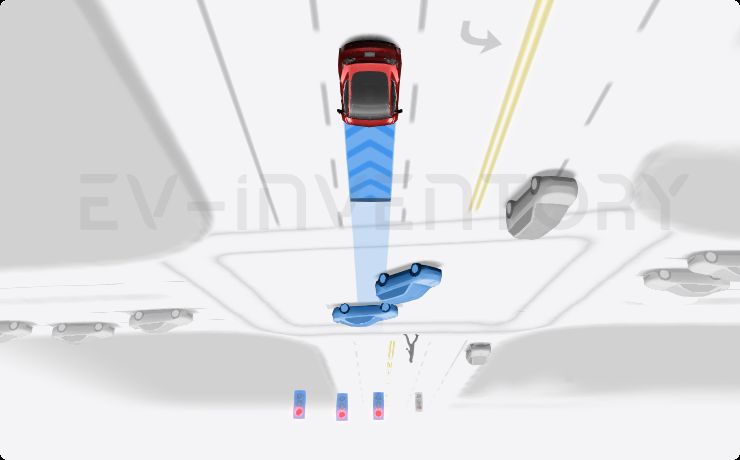
Grok with Navigation Commands (Beta) (part of 2026.2.6.5)
You can now talk to Grok, an intelligent assistant built by xAI. You can choose Grok's voice and personality, ranging from Storyteller to Unhinged.
Grok can add and edit navigation destinations, becoming your personal guide. You can ask Grok to navigate to the best Thai restaurant near you, find a Supercharger within walking distance of a coffee shop, or even plan a romantic sightseeing tour. Requires Premium Connectivity or a WiFi connection. Conversations are anonymous to Tesla and not associated with your vehicle.
To launch Grok, go to App Launcher > Grok, or long-press the voice button on your steering wheel after you have logged in to Grok. Set Grok's personality to Assistant to use Navigation Commands.
Note: Grok is currently in early Beta and does not support voice commands for car controls other than navigation. Existing voice commands remain unchanged.
- Seen in AU NZ
- Seen on MY M3(H) MY(J)
- Seen on AP Hardware HW4
- Seen on MCU hardware Ryzen
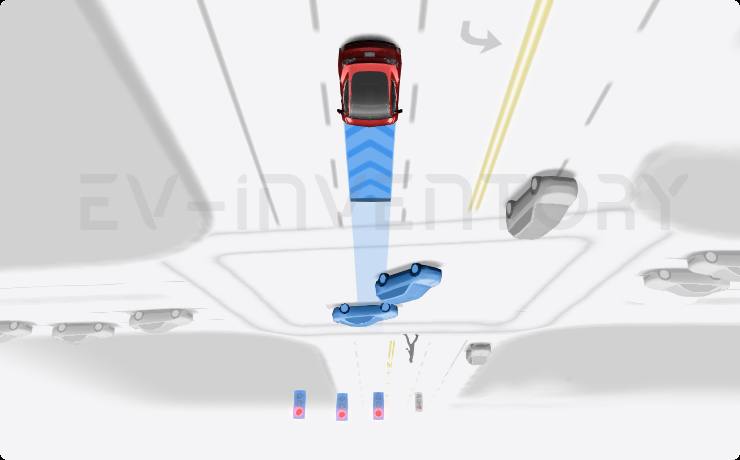
FSD (Supervised) v13.2.9 Down Under (part of 2026.2.6.5)
FSD (Supervised) v13 Down Under upgrades every part of the end-to-end driving network.
Includes:
- 36 Hz, full-resolution AI4 video inputs
- Native AI4 inputs and neural network architectures
- 4.2x data scaling
- 5x training compute scaling (enabled by the Cortex cluster)
- Reduced photon-to-control latency by 2x
- Integrated unpark, reverse, and park capabilities
- Improved reward predictions for collision avoidance
- Improved camera cleaning
- Redesigned controller for smoother, more accurate tracking
- Dynamic routing around road closures, which displays them along an affected route when they are detected by the fleet
Upcoming Improvements:
- 3x model size scaling
- 3x model context length scaling
- Audio inputs for better handling of emergency vehicles
- Improved reward predictions for navigation
- Improvements to false braking and slower driving in parking lots
- Support for destination options including pulling over, parking in a spot, driveway, or garage
- Efficient representation of maps and navigation inputs
- Improved handling of camera occlusions
- Seen in AU NZ
- Seen on MY M3(H) MY(J)
- Seen on AP Hardware HW4
- Seen on MCU hardware Ryzen
Full Self-Driving (Supervised) Down Under (part of 2026.2.6.5)
Under your supervision, Full Self-Driving (Supervised) Down Under can drive your Tesla almost anywhere. It will make lane changes, select forks to follow your navigation route, navigate around other vehicles and objects, and make left and right turns. You and anyone you authorise must use additional caution and remain attentive. It does not make your vehicle autonomous. Do not become complacent.
Full Self-Driving (Supervised) Down Under is enabled on your vehicle. To use the feature, press the right scroll wheel button once. You can disable Full Self-Driving (Supervised) Down Under in Autopilot Settings.
Be aware of road conditions or hazards (such as pot holes and speed bumps) and operate the vehicle responsibly under all circumstances.
- Seen in AU NZ
- Seen on MY M3(H) MY(J)
- Seen on AP Hardware HW4
- Seen on MCU hardware Ryzen
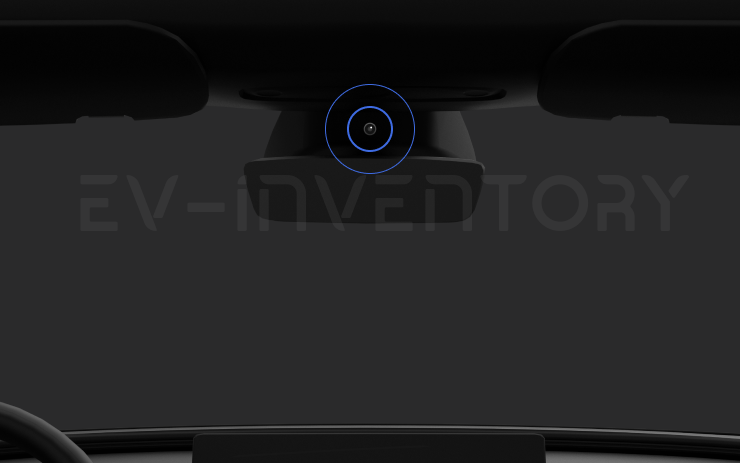
Vision-Based Attention Monitoring (part of 2026.2.6.5)
When Full Self-Driving (Supervised) is enabled, the driver monitoring system primarily relies on the cabin camera to determine driver attentiveness. Cabin camera must have clear visibility (e.g., camera is not occluded, eyes, arms, are visible, there is sufficient cabin illumination, and the driver is looking forward at the road without sunglasses, or other objects covering their eyes). In other circumstances, the driver monitoring system will primarily rely on torque-based (steering wheel) monitoring to detect driver attentiveness.
If the cabin camera detects inattentiveness, a warning will appear. The warning can be dismissed by the driver immediately reverting their attention back to the road ahead. Warnings will escalate depending on the nature and frequency of detected inattentiveness, with continuous inattention leading to a Strikeout.
Other release notes for the family: 2026.2
Grok with Navigation Commands (Beta) (part of 2026.2.6.5)
You can now talk to Grok, an intelligent assistant built by xAI. You can choose Grok's voice and personality, ranging from Storyteller to Unhinged.
Grok can add and edit navigation destinations, becoming your personal guide. You can ask Grok to navigate to the best Thai restaurant near you, find a Supercharger within walking distance of a coffee shop, or even plan a romantic sightseeing tour. Requires Premium Connectivity or a WiFi connection. Conversations are anonymous to Tesla and not associated with your vehicle.
To launch Grok, go to App Launcher > Grok, or long-press the voice button on your steering wheel after you have logged in to Grok. Set Grok's personality to Assistant to use Navigation Commands.
Note: Grok is currently in early Beta and does not support voice commands for car controls other than navigation. Existing voice commands remain unchanged.
Seen in AU NZ
Seen on MY M3(H) MY(J)
Seen on AP versions AP4
Seen on MCU hardware Ryzen
FSD (Supervised) v13.2.9 Down Under (part of 2026.2.6.5)
FSD (Supervised) v13 Down Under upgrades every part of the end-to-end driving network.
Includes:
- 36 Hz, full-resolution AI4 video inputs
- Native AI4 inputs and neural network architectures
- 4.2x data scaling
- 5x training compute scaling (enabled by the Cortex cluster)
- Reduced photon-to-control latency by 2x
- Integrated unpark, reverse, and park capabilities
- Improved reward predictions for collision avoidance
- Improved camera cleaning
- Redesigned controller for smoother, more accurate tracking
- Dynamic routing around road closures, which displays them along an affected route when they are detected by the fleet
Upcoming Improvements:
- 3x model size scaling
- 3x model context length scaling
- Audio inputs for better handling of emergency vehicles
- Improved reward predictions for navigation
- Improvements to false braking and slower driving in parking lots
- Support for destination options including pulling over, parking in a spot, driveway, or garage
- Efficient representation of maps and navigation inputs
- Improved handling of camera occlusions
Seen in AU NZ
Seen on MY M3(H) MY(J)
Seen on AP versions AP4
Seen on MCU hardware Ryzen
Full Self-Driving (Supervised) Down Under (part of 2026.2.6.5)
Under your supervision, Full Self-Driving (Supervised) Down Under can drive your Tesla almost anywhere. It will make lane changes, select forks to follow your navigation route, navigate around other vehicles and objects, and make left and right turns. You and anyone you authorise must use additional caution and remain attentive. It does not make your vehicle autonomous. Do not become complacent.
Full Self-Driving (Supervised) Down Under is enabled on your vehicle. To use the feature, press the right scroll wheel button once. You can disable Full Self-Driving (Supervised) Down Under in Autopilot Settings.
Be aware of road conditions or hazards (such as pot holes and speed bumps) and operate the vehicle responsibly under all circumstances.
Seen in AU NZ
Seen on MY M3(H) MY(J)
Seen on AP versions AP4
Seen on MCU hardware Ryzen
Vision-Based Attention Monitoring (part of 2026.2.6.5)
When Full Self-Driving (Supervised) is enabled, the driver monitoring system primarily relies on the cabin camera to determine driver attentiveness. Cabin camera must have clear visibility (e.g., camera is not occluded, eyes, arms, are visible, there is sufficient cabin illumination, and the driver is looking forward at the road without sunglasses, or other objects covering their eyes). In other circumstances, the driver monitoring system will primarily rely on torque-based (steering wheel) monitoring to detect driver attentiveness.
If the cabin camera detects inattentiveness, a warning will appear. The warning can be dismissed by the driver immediately reverting their attention back to the road ahead. Warnings will escalate depending on the nature and frequency of detected inattentiveness, with continuous inattention leading to a Strikeout.
Seen in AU NZ
Seen on MY M3(H) MY(J)
Seen on AP versions AP4
Seen on MCU hardware Ryzen
Grok with Navigation Commands (Beta) (part of 2026.2.6.1)
You can now talk to Grok, an intelligent assistant built by xAI. You can choose Grok's voice and personality, ranging from Storyteller to Unhinged.
Grok can add and edit navigation destinations, becoming your personal guide. You can ask Grok to navigate to the best Thai restaurant near you, find a Supercharger within walking distance of a coffee shop, or even plan a romantic sightseeing tour. Requires Premium Connectivity or a WiFi connection. Conversations are anonymous to Tesla and not associated with your vehicle.
To launch Grok, go to App Launcher > Grok, or long-press the voice button on your steering wheel after you have logged in to Grok. Set Grok's personality to Assistant to use Navigation Commands.
Note: Grok is currently in early Beta and does not support voice commands for car controls other than navigation. Existing voice commands remain unchanged.
Seen in AU NZ
Seen on M3 MY M3(H) MY(J)
Seen on AP versions AP3 AP4
Seen on MCU hardware Ryzen
Minor Fixes (part of 2026.2.6.1)
This release contains minor fixes and improvements
Seen in AU NZ TH
Seen on M3 MY
Seen on AP versions AP3
Seen on MCU hardware Intel Ryzen
Grok with Navigation Commands (Beta) (part of 2026.2.6)
You can now talk to Grok, an intelligent assistant built by xAI. You can choose Grok's voice and personality, ranging from Storyteller to Unhinged.
Grok can add and edit navigation destinations, becoming your personal guide. You can ask Grok to navigate to the best Thai restaurant near you, find a Supercharger within walking distance of a coffee shop, or even plan a romantic sightseeing tour. Requires Premium Connectivity or a WiFi connection. Conversations are anonymous to Tesla and not associated with your vehicle.
To launch Grok, go to App Launcher > Grok, or long-press the voice button on your steering wheel after you have logged in to Grok. Set Grok's personality to Assistant to use Navigation Commands.
Note: Grok is currently in early Beta and does not support voice commands for car controls other than navigation. Existing voice commands remain unchanged.
Seen in AE AT BE CH CZ DE ES FR GB GG GR HR IE IT LU NL PT RE SE SI
Seen on MS(2021+) MX(2022+) M3 MY M3(H) MY(J)
Seen on AP versions AP3 AP4
Seen on MCU hardware Intel Ryzen
Minor Fixes (part of 2026.2.6)
This release contains minor fixes and improvements
Seen in AT AU BR BY CA CH DE DO ES FR GB HK IE IT JP MX MY NL NZ PR PT SG TH TW UA US
Seen on MX MS(2021+) MX(2022+) M3 MY M3(H) MY(J) CT
Seen on AP versions AP1 AP2,5 AP3 AP4 PreAP1
Seen on MCU hardware Intel Ryzen
Minor Fixes (part of 2026.2.3.1)
This release contains minor fixes and improvements
Seen in TW
Seen on MY(J)
Seen on AP versions AP4
Seen on MCU hardware Ryzen

Unlatching Charge Cable (part of 2026.2.3)
Charging can now be stopped and the charge cable released by pulling and holding the rear left door handle for 3 seconds, provided the vehicle is unlocked or a recognized key is nearby. This is especially useful when the charge cable unlatch button does not work or a charging adapter is stuck in the charge port. You can still release the cable using the vehicle touchscreen or the Tesla app.
Seen in BR CA DO MX PR RU TW UA US
Seen on M3 MY M3(H) MY(J)
Seen on AP versions AP2,5 AP3 AP4
Seen on MCU hardware Intel Ryzen
Minor Fixes (part of 2026.2.3)
This release contains minor fixes and improvements
Seen in AE AT AU BA BE BG BY CA CH CZ DE DK EE ES FI FR GB GG GR HK HR HU IE IL IS IT JP LT LU LV MD MK MO MY NL NO NZ PL PR PS PT RO RS SE SG SI SK TH TR TW UA US
Seen on MX MS(2021+) MX(2022+) M3 MY M3(H) MY(J) CT
Seen on AP versions AP1 AP2,5 AP3 AP4 PreAP1
Seen on MCU hardware Intel Ryzen

Child Left Alone Detection (part of 2026.2.3)
If an unattended child is detected, the vehicle will flash the exterior indicator lights, play an alert tone, and send a notification to your Tesla app. This will repeat at regular intervals until you return to your vehicle. Cabin data is processed locally and is not transmitted to Tesla.
This feature is enabled by default. To disable, go to Controls > Safety > Child Left Alone Detection.
Seen in IL
Seen on M3(H) MY(J)
Seen on AP versions AP4
Seen on MCU hardware Ryzen
Minor Fixes (part of 2026.2)
This release contains minor fixes and improvements
Seen in AT AU BE CA CH CZ DE DK ES FI FR GB GR IE IT MY NL NO PL PR PT RO SE SG SI TH TR TW US
Seen on MX MS(2021+) MX(2022+) MY M3(H) MY(J)
Seen on AP versions AP3 AP4
Seen on MCU hardware Intel Ryzen
How do I get the latest Software Update from Tesla?
- Seen in AU NZ
- Seen on MY M3(H) MY(J)
- Seen on AP Hardware HW4
- Seen on MCU hardware Ryzen
Grok with Navigation Commands (Beta) (part of 2026.2.6.5)
You can now talk to Grok, an intelligent assistant built by xAI. You can choose Grok's voice and personality, ranging from Storyteller to Unhinged.
Grok can add and edit navigation destinations, becoming your personal guide. You can ask Grok to navigate to the best Thai restaurant near you, find a Supercharger within walking distance of a coffee shop, or even plan a romantic sightseeing tour. Requires Premium Connectivity or a WiFi connection. Conversations are anonymous to Tesla and not associated with your vehicle.
To launch Grok, go to App Launcher > Grok, or long-press the voice button on your steering wheel after you have logged in to Grok. Set Grok's personality to Assistant to use Navigation Commands.
Note: Grok is currently in early Beta and does not support voice commands for car controls other than navigation. Existing voice commands remain unchanged.
- Seen in AU NZ
- Seen on MY M3(H) MY(J)
- Seen on AP Hardware HW4
- Seen on MCU hardware Ryzen
FSD (Supervised) v13.2.9 Down Under (part of 2026.2.6.5)
FSD (Supervised) v13 Down Under upgrades every part of the end-to-end driving network.
Includes:
- 36 Hz, full-resolution AI4 video inputs
- Native AI4 inputs and neural network architectures
- 4.2x data scaling
- 5x training compute scaling (enabled by the Cortex cluster)
- Reduced photon-to-control latency by 2x
- Integrated unpark, reverse, and park capabilities
- Improved reward predictions for collision avoidance
- Improved camera cleaning
- Redesigned controller for smoother, more accurate tracking
- Dynamic routing around road closures, which displays them along an affected route when they are detected by the fleet
Upcoming Improvements:
- 3x model size scaling
- 3x model context length scaling
- Audio inputs for better handling of emergency vehicles
- Improved reward predictions for navigation
- Improvements to false braking and slower driving in parking lots
- Support for destination options including pulling over, parking in a spot, driveway, or garage
- Efficient representation of maps and navigation inputs
- Improved handling of camera occlusions
- Seen in AU NZ
- Seen on MY M3(H) MY(J)
- Seen on AP Hardware HW4
- Seen on MCU hardware Ryzen
Full Self-Driving (Supervised) Down Under (part of 2026.2.6.5)
Under your supervision, Full Self-Driving (Supervised) Down Under can drive your Tesla almost anywhere. It will make lane changes, select forks to follow your navigation route, navigate around other vehicles and objects, and make left and right turns. You and anyone you authorise must use additional caution and remain attentive. It does not make your vehicle autonomous. Do not become complacent.
Full Self-Driving (Supervised) Down Under is enabled on your vehicle. To use the feature, press the right scroll wheel button once. You can disable Full Self-Driving (Supervised) Down Under in Autopilot Settings.
Be aware of road conditions or hazards (such as pot holes and speed bumps) and operate the vehicle responsibly under all circumstances.
- Seen in AU NZ
- Seen on MY M3(H) MY(J)
- Seen on AP Hardware HW4
- Seen on MCU hardware Ryzen
Vision-Based Attention Monitoring (part of 2026.2.6.5)
When Full Self-Driving (Supervised) is enabled, the driver monitoring system primarily relies on the cabin camera to determine driver attentiveness. Cabin camera must have clear visibility (e.g., camera is not occluded, eyes, arms, are visible, there is sufficient cabin illumination, and the driver is looking forward at the road without sunglasses, or other objects covering their eyes). In other circumstances, the driver monitoring system will primarily rely on torque-based (steering wheel) monitoring to detect driver attentiveness.
If the cabin camera detects inattentiveness, a warning will appear. The warning can be dismissed by the driver immediately reverting their attention back to the road ahead. Warnings will escalate depending on the nature and frequency of detected inattentiveness, with continuous inattention leading to a Strikeout.
Grok with Navigation Commands (Beta) (part of 2026.2.6.5)
You can now talk to Grok, an intelligent assistant built by xAI. You can choose Grok's voice and personality, ranging from Storyteller to Unhinged.
Grok can add and edit navigation destinations, becoming your personal guide. You can ask Grok to navigate to the best Thai restaurant near you, find a Supercharger within walking distance of a coffee shop, or even plan a romantic sightseeing tour. Requires Premium Connectivity or a WiFi connection. Conversations are anonymous to Tesla and not associated with your vehicle.
To launch Grok, go to App Launcher > Grok, or long-press the voice button on your steering wheel after you have logged in to Grok. Set Grok's personality to Assistant to use Navigation Commands.
Note: Grok is currently in early Beta and does not support voice commands for car controls other than navigation. Existing voice commands remain unchanged.
Seen in AU NZ
Seen on MY M3(H) MY(J)
Seen on AP versions AP4
Seen on MCU hardware Ryzen
FSD (Supervised) v13.2.9 Down Under (part of 2026.2.6.5)
FSD (Supervised) v13 Down Under upgrades every part of the end-to-end driving network.
Includes:
- 36 Hz, full-resolution AI4 video inputs
- Native AI4 inputs and neural network architectures
- 4.2x data scaling
- 5x training compute scaling (enabled by the Cortex cluster)
- Reduced photon-to-control latency by 2x
- Integrated unpark, reverse, and park capabilities
- Improved reward predictions for collision avoidance
- Improved camera cleaning
- Redesigned controller for smoother, more accurate tracking
- Dynamic routing around road closures, which displays them along an affected route when they are detected by the fleet
Upcoming Improvements:
- 3x model size scaling
- 3x model context length scaling
- Audio inputs for better handling of emergency vehicles
- Improved reward predictions for navigation
- Improvements to false braking and slower driving in parking lots
- Support for destination options including pulling over, parking in a spot, driveway, or garage
- Efficient representation of maps and navigation inputs
- Improved handling of camera occlusions
Seen in AU NZ
Seen on MY M3(H) MY(J)
Seen on AP versions AP4
Seen on MCU hardware Ryzen
Full Self-Driving (Supervised) Down Under (part of 2026.2.6.5)
Under your supervision, Full Self-Driving (Supervised) Down Under can drive your Tesla almost anywhere. It will make lane changes, select forks to follow your navigation route, navigate around other vehicles and objects, and make left and right turns. You and anyone you authorise must use additional caution and remain attentive. It does not make your vehicle autonomous. Do not become complacent.
Full Self-Driving (Supervised) Down Under is enabled on your vehicle. To use the feature, press the right scroll wheel button once. You can disable Full Self-Driving (Supervised) Down Under in Autopilot Settings.
Be aware of road conditions or hazards (such as pot holes and speed bumps) and operate the vehicle responsibly under all circumstances.
Seen in AU NZ
Seen on MY M3(H) MY(J)
Seen on AP versions AP4
Seen on MCU hardware Ryzen
Vision-Based Attention Monitoring (part of 2026.2.6.5)
When Full Self-Driving (Supervised) is enabled, the driver monitoring system primarily relies on the cabin camera to determine driver attentiveness. Cabin camera must have clear visibility (e.g., camera is not occluded, eyes, arms, are visible, there is sufficient cabin illumination, and the driver is looking forward at the road without sunglasses, or other objects covering their eyes). In other circumstances, the driver monitoring system will primarily rely on torque-based (steering wheel) monitoring to detect driver attentiveness.
If the cabin camera detects inattentiveness, a warning will appear. The warning can be dismissed by the driver immediately reverting their attention back to the road ahead. Warnings will escalate depending on the nature and frequency of detected inattentiveness, with continuous inattention leading to a Strikeout.
Seen in AU NZ
Seen on MY M3(H) MY(J)
Seen on AP versions AP4
Seen on MCU hardware Ryzen
Grok with Navigation Commands (Beta) (part of 2026.2.6.1)
You can now talk to Grok, an intelligent assistant built by xAI. You can choose Grok's voice and personality, ranging from Storyteller to Unhinged.
Grok can add and edit navigation destinations, becoming your personal guide. You can ask Grok to navigate to the best Thai restaurant near you, find a Supercharger within walking distance of a coffee shop, or even plan a romantic sightseeing tour. Requires Premium Connectivity or a WiFi connection. Conversations are anonymous to Tesla and not associated with your vehicle.
To launch Grok, go to App Launcher > Grok, or long-press the voice button on your steering wheel after you have logged in to Grok. Set Grok's personality to Assistant to use Navigation Commands.
Note: Grok is currently in early Beta and does not support voice commands for car controls other than navigation. Existing voice commands remain unchanged.
Seen in AU NZ
Seen on M3 MY M3(H) MY(J)
Seen on AP versions AP3 AP4
Seen on MCU hardware Ryzen
Minor Fixes (part of 2026.2.6.1)
This release contains minor fixes and improvements
Seen in AU NZ TH
Seen on M3 MY
Seen on AP versions AP3
Seen on MCU hardware Intel Ryzen
Grok with Navigation Commands (Beta) (part of 2026.2.6)
You can now talk to Grok, an intelligent assistant built by xAI. You can choose Grok's voice and personality, ranging from Storyteller to Unhinged.
Grok can add and edit navigation destinations, becoming your personal guide. You can ask Grok to navigate to the best Thai restaurant near you, find a Supercharger within walking distance of a coffee shop, or even plan a romantic sightseeing tour. Requires Premium Connectivity or a WiFi connection. Conversations are anonymous to Tesla and not associated with your vehicle.
To launch Grok, go to App Launcher > Grok, or long-press the voice button on your steering wheel after you have logged in to Grok. Set Grok's personality to Assistant to use Navigation Commands.
Note: Grok is currently in early Beta and does not support voice commands for car controls other than navigation. Existing voice commands remain unchanged.
Seen in AE AT BE CH CZ DE ES FR GB GG GR HR IE IT LU NL PT RE SE SI
Seen on MS(2021+) MX(2022+) M3 MY M3(H) MY(J)
Seen on AP versions AP3 AP4
Seen on MCU hardware Intel Ryzen
Minor Fixes (part of 2026.2.6)
This release contains minor fixes and improvements
Seen in AT AU BR BY CA CH DE DO ES FR GB HK IE IT JP MX MY NL NZ PR PT SG TH TW UA US
Seen on MX MS(2021+) MX(2022+) M3 MY M3(H) MY(J) CT
Seen on AP versions AP1 AP2,5 AP3 AP4 PreAP1
Seen on MCU hardware Intel Ryzen
Minor Fixes (part of 2026.2.3.1)
This release contains minor fixes and improvements
Seen in TW
Seen on MY(J)
Seen on AP versions AP4
Seen on MCU hardware Ryzen
Unlatching Charge Cable (part of 2026.2.3)
Charging can now be stopped and the charge cable released by pulling and holding the rear left door handle for 3 seconds, provided the vehicle is unlocked or a recognized key is nearby. This is especially useful when the charge cable unlatch button does not work or a charging adapter is stuck in the charge port. You can still release the cable using the vehicle touchscreen or the Tesla app.
Seen in BR CA DO MX PR RU TW UA US
Seen on M3 MY M3(H) MY(J)
Seen on AP versions AP2,5 AP3 AP4
Seen on MCU hardware Intel Ryzen
Minor Fixes (part of 2026.2.3)
This release contains minor fixes and improvements
Seen in AE AT AU BA BE BG BY CA CH CZ DE DK EE ES FI FR GB GG GR HK HR HU IE IL IS IT JP LT LU LV MD MK MO MY NL NO NZ PL PR PS PT RO RS SE SG SI SK TH TR TW UA US
Seen on MX MS(2021+) MX(2022+) M3 MY M3(H) MY(J) CT
Seen on AP versions AP1 AP2,5 AP3 AP4 PreAP1
Seen on MCU hardware Intel Ryzen
Child Left Alone Detection (part of 2026.2.3)
If an unattended child is detected, the vehicle will flash the exterior indicator lights, play an alert tone, and send a notification to your Tesla app. This will repeat at regular intervals until you return to your vehicle. Cabin data is processed locally and is not transmitted to Tesla.
This feature is enabled by default. To disable, go to Controls > Safety > Child Left Alone Detection.
Seen in IL
Seen on M3(H) MY(J)
Seen on AP versions AP4
Seen on MCU hardware Ryzen
Minor Fixes (part of 2026.2)
This release contains minor fixes and improvements
Seen in AT AU BE CA CH CZ DE DK ES FI FR GB GR IE IT MY NL NO PL PR PT RO SE SG SI TH TR TW US
Seen on MX MS(2021+) MX(2022+) MY M3(H) MY(J)
Seen on AP versions AP3 AP4
Seen on MCU hardware Intel Ryzen
There is o reliable way to get the a software update from Tesla unless it is linked to a service request.
I do not have all the features listed?
Some features are only available on some models, versions of hardware, software options purchased and even countries. We list as much information as we can as to which of those are required for each feature based on the information taken from real cars.